Half the URLs in old briefs are dead. Here is how law librarians use the Wayback Machine and stronger archives to verify citations, build timelines, and support litigation.

Wayback Machine for Legal Research
In 2014, a Harvard study by Jonathan Zittrain, Kendra Albert, and Lawrence Lessig found that 49% of URLs cited in US Supreme Court opinions had broken within six years of being cited. Nearly half. In opinions of the highest court in the country.
Lower courts and law journals are no better. A footnote written in 2018 that pointed to an SEC press release, an agency guidance document, or a defendant's website is now, statistically, a coin flip. The link still goes somewhere or it does not.
For law librarians, this is not a minor inconvenience. It is the gap between a brief that holds up under cite-checking and one that quietly falls apart. It is also the difference between a litigation timeline a partner can rely on and one full of "page not found" placeholders.
This guide covers how law librarians use Wayback Machine alternatives and the broader web-archive toolkit in legal research. What the Wayback Machine does well, where it falls short, and the tools that fill the gaps when stakes go up.
Why Web Archives Matter in Legal Research
Web archives serve four distinct legal-research jobs. Each has different evidence and citation requirements.
Citation verification and cite-checking. Briefs, memos, and law journal articles cite URLs constantly. A junior associate cite-checks a brief and finds half the linked sources are dead. The librarian's first move is the Wayback Machine. If the cited URL was archived around the date of the original citation, the brief stays defensible. If not, the citation needs to be replaced or pulled.
Litigation timelines. Plaintiff's counsel needs to prove what a defendant claimed on its website on a specific date. Defendant's counsel needs to prove what an agency said publicly before a regulatory action. Both rely on dated archive snapshots. The work is forensic: who said what, on what page, on what date, and can we authenticate it.
Due diligence and corporate research. M&A diligence routinely requires reviewing how a target company has described itself, its products, its terms of service, and its representations over time. The Wayback Machine is the default starting point for this kind of historical reading.
Regulatory and policy research. When an agency revises guidance, withdraws a rule, or quietly edits an FAQ, the historical version often matters more than the current one. Tracking what changed, when, on a regulator's site is part of regulatory change management and a recurring law-librarian task.
These four jobs do not all have the same evidence threshold. A cite-check needs a page snapshot from roughly the right time. A litigation timeline needs an authenticated, hash-verified, court-admissible record. The librarian's job is to know which job they are doing and reach for the right tool.
Paste a URL. We'll do the rest.
Changeflow monitors the page and tells you what changed and why it matters.
Free plan available. No credit card required.
What the Wayback Machine Does Well
The Wayback Machine, run by the Internet Archive since 1996, is the largest free web archive in the world. It crawls the public web on its own schedule and stores hundreds of billions of pages.
For law-firm research, three strengths matter.
Coverage. The Wayback Machine has snapshots of sites going back nearly thirty years. For most major news sites, government pages, and large corporate sites, you will find historical captures across many years. This is unrivalled for free.
No friction. No login, no fee, no sales call. A librarian pastes a URL, picks a date, and reads the page. For most cite-check work, that is the entire workflow.
Save Page Now. If you find a live page you suspect will not survive, you can use the Wayback Machine's "Save Page Now" feature to force an immediate capture. This is a quick way to preserve a page during active research, although the resulting capture has the same limitations as any other Wayback snapshot.
For routine law librarian current awareness and citation work, the Wayback Machine is the default starting point and the right one. The questions begin when stakes rise.
Where the Wayback Machine Falls Short for Legal Work
Treating the Wayback Machine as the entire archiving toolkit creates real problems in legal research. Five recurring failure modes.
Coverage is incomplete and uneven. The Internet Archive crawls on its own priorities. Major sites get crawled often. Smaller agency pages, state regulator subdomains, and content behind shallow JavaScript may have months between captures, or no captures at all. For litigation, a 90-day gap between snapshots is often the difference between proving and not proving what a page said.
Robots.txt and removal requests. Site owners can block the Internet Archive via robots.txt, and they can request that historical captures be removed. When a defendant scrubs an embarrassing page and excludes the Wayback Machine, the historical record disappears with no notice. Librarians supporting active matters discover this the hard way, usually mid-deposition.
No audit trail. A Wayback Machine capture is an HTML rendering. It is not signed. It does not include a hash of the captured bytes. It does not log who retrieved it or when. Under FRE 902(13) and 902(14), self-authentication of digital records requires a process that produces this metadata. The Wayback Machine alone does not. See our guide on eDiscovery website evidence for what courts actually require.
No monitoring layer. The Wayback Machine archives. It does not alert. If you want to know when a regulator updates a guidance page, you cannot point Wayback at it and ask to be notified. That is a different tool entirely.
Dynamic content and authentication walls. Pages behind login walls, dynamically rendered single-page apps, and content loaded after user interaction often capture as broken or empty. Court electronic-filing systems, paywalled news, and many modern agency dashboards fall into this category.
For routine library research these limits are tolerable. For citation work in active litigation, defensible due diligence, or anything a partner will sign their name to, the librarian needs more.
The Toolkit Beyond the Wayback Machine
Most experienced firm librarians run a small toolkit, not a single tool. Each piece has a specific job.
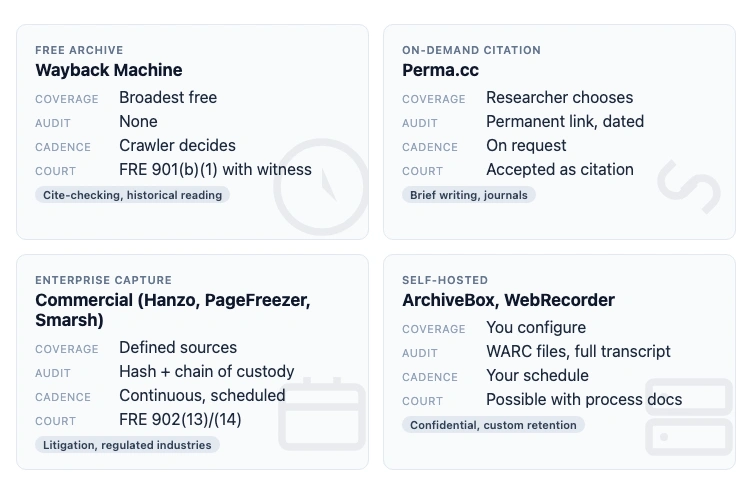
Perma.cc is the on-demand citation archive of choice in US legal academia. Built by the Harvard Library Innovation Lab, it lets a researcher capture a URL at a specific moment and produces a permanent perma.cc link that courts and law journals accept as a stable citation. Many federal court rules and law journals now require Perma links for any URL citation. For active brief writing, this is the right primary tool. Free for academic and judicial users, paid plans for firms.
Archive.today (also archive.is and archive.ph) is a fast, on-demand archiving service that captures both HTML and a screenshot. Useful when the Wayback Machine has not crawled a page yet, or when robots.txt blocks it. Same limitations as the Wayback Machine for evidence work, plus its hosting and access can be unreliable in some jurisdictions. See our roundup of Archive.is alternatives for sister tools.
ArchiveBox is an open-source self-hosted archive. A firm with technical capacity can run its own archive of every URL its lawyers cite, every time. Useful when client confidentiality, retention policies, or jurisdictional concerns make a third-party archive a non-starter.
WebRecorder and Conifer capture pages as WARC files, the format used by national libraries and court archives. WARC files preserve full request-response transcripts and are the closest free option to forensic-grade capture. The trade-off is technical complexity.
Commercial archiving and monitoring services. Hanzo, PageFreezer, Smarsh, and similar vendors offer hash-verified, audit-trailed, court-admissible archives with retention policies aligned to financial-services and legal-industry compliance frameworks. These are the tools for matters where the archive itself becomes evidence. Pricing is enterprise.
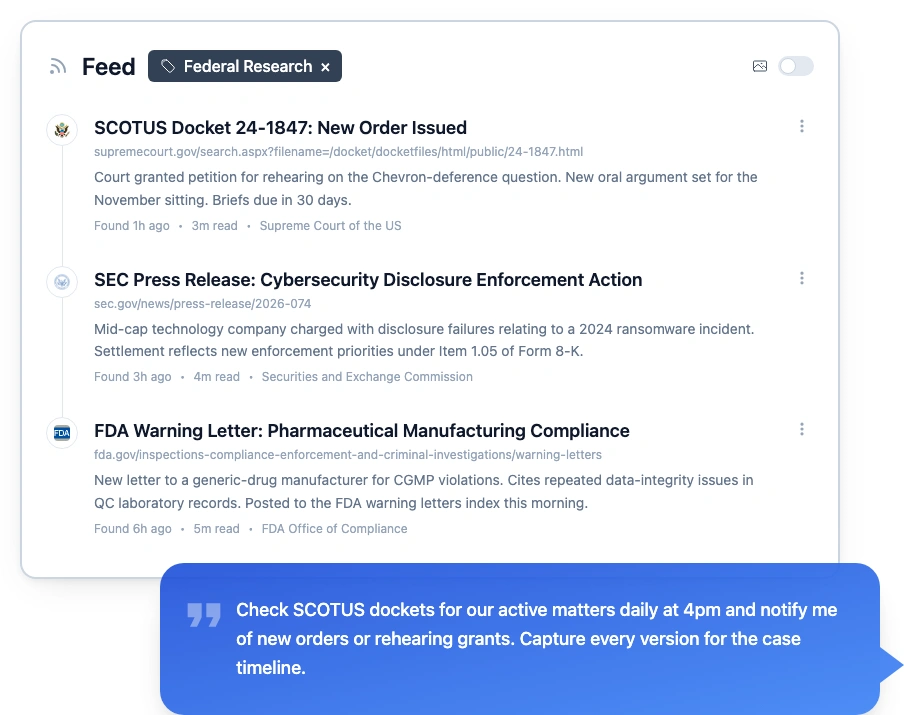
Continuous monitoring tools. Distinct from archiving. A monitoring tool watches a live page on a known schedule, captures every version, and alerts when content changes. For tracking court website changes, SEC filings, FDA guidance, and other government agency pages, this is the layer the Wayback Machine cannot provide.
The toolkit pattern most firms land on: Wayback Machine for fast historical reading, Perma.cc for citation work, a commercial service for litigation-grade evidence on key matters, and a monitoring tool for ongoing agency and regulator tracking.
FRE 902 and Authentication: What Courts Actually Want
Federal Rule of Evidence 902(13) and 902(14) cover self-authentication of records generated by an electronic process or system. The drafters' notes are explicit: courts want records that come with a clear chain of custody, a process the proponent can describe, and metadata that makes tampering detectable.
Wayback Machine snapshots fail several of these requirements unless paired with witness testimony. Specifically:
- No signed timestamp. A snapshot's URL contains a timestamp, but it is not cryptographically signed.
- No hash of bytes captured. Without a hash, you cannot prove the rendered HTML you see today is the same as what was archived on the date.
- No process documentation. Courts often want a declaration of the capture process. The Internet Archive will provide affidavits in some cases, but the lead time and limited scope make this impractical for routine litigation.
This is why federal courts admit Wayback evidence most often via FRE 901(b)(1) testimony from a witness with knowledge, typically a paralegal or librarian who declares how they retrieved the snapshot. It works, but it is fragile, contestable, and forces a knowledge worker to take a witness role they did not sign up for.
For high-stakes evidence work, a tool that produces hashed, signed, timestamped captures by default removes that fragility. Our guide on website archiving compliance covers what makes an archive legally defensible.
A Practical Workflow for Legal Research
What does a competent law-librarian web-archive workflow look like in practice?
For cite-checking and routine research. Start with the Wayback Machine. If a snapshot exists near the citation date, capture the URL and the snapshot timestamp in your research notes. If no snapshot exists, try archive.today and the live page (which can be Save-Page-Now-d to Wayback for future protection).
For brief writing and law journal work. Default to Perma.cc on every URL you cite, the moment you cite it. The five seconds it takes to generate a Perma link saves the cite-check rework later and protects against the URL going dead between drafting and publication.
For litigation evidence. Use a commercial service with hash verification, audit trail, and chain-of-custody documentation. The librarian's job is to know which matters cross this threshold, usually anything where the archived page becomes a piece of evidence rather than a research support.
For regulatory and agency tracking. Wayback is the wrong tool. Use a continuous monitoring service that watches the live page, captures every version, and alerts the practice group when something changes. This is the gap the legal solutions and change detection layer fills, and it sits alongside the existing current awareness stack rather than replacing any part of it.
For due diligence. Combine Wayback Machine historical reading with on-demand Perma.cc captures of any page the team will cite in the diligence memo. Document which sources are which and whether they are evidence-grade.
The mistake to avoid: treating any one tool as the entire workflow. The Wayback Machine is excellent for the first 80% of legal research and dangerous as the only tool for the last 20%.
Where This Connects to Current Awareness
A web-archive toolkit is one half of the modern librarian's evidence layer. The other half is current awareness: ongoing monitoring of regulators, courts, and clients so that the firm sees changes as they happen, not weeks later in a Wayback diff.
The two halves work together. Current awareness catches changes. The archive proves what was there before the change. A firm that runs both has a complete record. A firm that runs only one, in either direction, has gaps that turn up at the worst possible moments.
Most large firm libraries are stronger on current awareness than on archiving. Westlaw, Lexis, Vable, Manzama, and the rest of the Tier 1 and Tier 2 stack handle the alerts. The archive layer is more often improvised, with the Wayback Machine doing more work than it should and Perma.cc deployed inconsistently. Closing that gap is one of the higher-return moves a knowledge-management team can make in 2026.
Frequently Asked Questions
Is the Wayback Machine admissible in court?
Yes, with caveats. Federal courts have admitted Wayback Machine evidence under FRE 901(b)(1) when authenticated by a witness with knowledge, often a paralegal or librarian declaring how they accessed the snapshot. The page itself is hearsay unless an exception applies. Treat Wayback as proof a page existed at a point in time, not as proof of the truth of its contents.
How do law librarians use the Wayback Machine?
Mostly for citation verification, link rot recovery, brief support, and historical research. When an opinion or memo cites a URL that is now dead, librarians retrieve the archived version. They also build timelines of what an agency or company published on a specific date for litigation, due diligence, and regulatory comment work.
What is the difference between the Wayback Machine and Perma.cc?
The Wayback Machine archives the public web on its own crawl schedule and is the largest free archive available. Perma.cc, run by the Harvard Library Innovation Lab, lets a researcher capture a specific URL on demand and produces a permanent citation link courts and law journals accept. Wayback is broad and historical. Perma.cc is on-demand and citation-grade.
Why are so many citation URLs broken in old legal briefs?
Link rot. A 2014 study by Zittrain, Albert, and Lessig found roughly half of URLs cited in US Supreme Court opinions had failed within six years. State supreme court and law journal rates are similar. Sites move, redesign, paywall, or shut down, and citation links go dead fast unless they were captured at the time of writing.
Can I use the Wayback Machine to monitor an agency website for changes?
No. The Wayback Machine archives pages on its own schedule, which is too irregular and incomplete to use as a monitoring layer. For ongoing change detection on agency, regulator, or court websites, use a dedicated monitoring tool that watches the live page and captures every version on a known cadence.
Build a research-ready archive of every page that matters
Track agency, court, and regulator pages. Get timestamped snapshots and AI summaries every time a page changes.
Try Changeflow FreeNo credit card required
More from Learn
Law Librarian Current Awareness Audit Checklist (2026)
A 27-question audit covering coverage, cadence, relevance, distribution, resilience, and value. Built for law librarians and knowledge lawyers running current awareness at Am Law 200 firms.
Audit-Ready Web Archives: SEC 17a-4, FDA, and HIPAA Rules
Free archive tools fail under regulatory audit. Here is what SEC 17a-4, FDA 21 CFR Part 11, and HIPAA require from a web archive that holds up under examination.
What Regulatory Change Management Software Actually Costs
Real pricing data for 14 regulatory change management platforms, from LogicGate at $52K median to MetricStream crossing $1M. What is public, what we reconstructed from funding and filings, and what the vendors refuse to publish.