
Track new court opinions, orders, and rule changes automatically. A practical guide to monitoring court websites for legal professionals and researchers.

Court Website Monitoring for Legal Research
A new opinion drops on a Friday afternoon. By Monday, opposing counsel has already cited it. You find out Tuesday, from a colleague.
This happens more than anyone in legal practice wants to admit. Courts publish opinions, orders, and rule changes on their websites constantly. No single tool catches everything. And the higher the stakes, the worse it feels to be the last one to know.
This guide covers how to track court websites systematically, what tools exist (free and paid), and where the gaps are that most legal professionals miss.
What Court Content Actually Changes
Court websites publish far more than opinions. Understanding what changes helps you decide what to monitor.
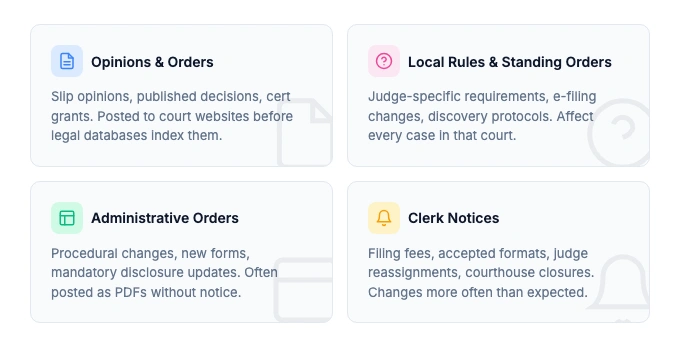
Opinions and orders are the obvious ones. Slip opinions from the Supreme Court, published and unpublished decisions from circuit courts, and appellate opinions from state courts. These shape precedent, and being early matters.
Local rules and standing orders change quietly. A judge updates their standing order on discovery disputes. The clerk's office revises e-filing requirements. These don't show up in docket systems, but they affect how you practice in that court every day.
Administrative orders cover everything from COVID-era remote procedures to new mandatory disclosure forms. Courts post them as PDFs or announcements, often without fanfare.
Court notices include judge reassignments, courthouse closures, new case management procedures, and changes to oral argument calendars. Miss a notice about your judge's retirement and the reassignment, and your case strategy might be built on the wrong assumptions.
Clerk office updates cover filing fees, accepted formats, local forms, and procedural requirements. These change more often than you'd expect.
The pattern: most of this content lives on court websites but not in docket databases. That's the gap. And when you need to prove what a court page said on a specific date, you need more than a bookmark. Free archives like Wayback Machine alternatives capture historical court pages occasionally, but rarely on the schedule litigation needs. See our guide on eDiscovery website evidence for what courts actually require.
Monitor regulatory pages automatically
Changeflow watches agency websites and tells you what changed and why it matters.
Free plan available. No credit card required.
Federal Courts Worth Monitoring
The federal system has clear structure but scattered content. Here's what matters.
Supreme Court
The Supreme Court opinions page publishes slip opinions the day they're issued, usually at 10 AM ET. The orders list updates on conference days (typically Mondays during the term). Cert grants, GVRs, and summary dispositions all appear here before anywhere else.
For practitioners in constitutional law, administrative law, or any practice area touched by SCOTUS decisions, monitoring the slip opinions page directly is the fastest signal.
Circuit Courts of Appeals
Each of the 13 federal circuits maintains its own opinions page. The volume varies. The Ninth Circuit publishes hundreds of opinions per year. The Federal Circuit publishes patent and trade decisions critical for IP practitioners.
Key pages to track:
- Published opinions (precedential)
- Unpublished/non-precedential opinions (still useful for pattern recognition)
- Oral argument calendars
- Circuit rules and internal operating procedures
District Courts
District courts post local rules, standing orders, and judge-specific requirements. If you practice in a specific district, these pages are high-value monitoring targets. A local rules change can affect every case you have pending in that court.
Specialty Courts
U.S. Tax Court opinions affect every tax practitioner. The Court of International Trade publishes trade and customs decisions. Bankruptcy courts post local rules and sometimes publish opinions outside the standard appellate track.
State Courts: Where the Volume Lives
Most litigation happens in state court. Most state court content is harder to track than federal.
State supreme courts and intermediate appellate courts post opinions on their websites. Some states have excellent, well-organized opinion pages. Others bury new decisions in clunky CMS platforms that haven't been updated since 2008.
States with well-structured opinion pages (easier to monitor): California Courts, New York Court of Appeals, Texas Courts, Illinois Courts, Florida Courts. These tend to have dedicated opinion search pages with recent decisions listed chronologically.
States with less accessible pages (still monitorable, just needs the right approach): Smaller states sometimes post opinions as PDF links buried in news sections or press releases.
For regulatory compliance, state courts matter enormously. A state supreme court decision on data privacy, employment law, or insurance regulation can reshape compliance requirements overnight. Teams already tracking government website changes for regulatory sources should add court opinion pages to their monitoring list.
Free Tools for Court Monitoring
Before paying for anything, know what's available for free.
CourtListener
CourtListener from the Free Law Project is the best free tool for court opinion monitoring. It indexes millions of opinions from hundreds of federal and state jurisdictions and offers three alert types:
- Search Alerts: get emailed when new opinions match your search terms
- Docket Alerts: monitor specific PACER cases for new activity
- Citation Alerts: know when a case you care about gets cited in a new opinion
Search alerts are particularly useful. Set one for a legal concept in your practice area and you'll hear about new opinions within roughly an hour of publication. That's faster than most paid legal databases index new decisions.
The RECAP Archive also crowdsources PACER documents, making millions of federal court filings freely available that would otherwise cost $0.10 per page.
PACER RSS Feeds
Many federal courts offer RSS feeds for new filings and opinions. These are free and don't incur PACER fees. The catch: you need an RSS reader, and not every court offers them. But for courts you practice in frequently, RSS feeds are a simple, zero-cost monitoring option.
Google Scholar
Google Scholar indexes court opinions and lets you create alerts for search queries across case law. It's not as fast as CourtListener, and the coverage has gaps, but it's free and requires zero setup.
Paid Court Monitoring Platforms
When free tools aren't enough, several commercial platforms fill the gaps.
CourtLink (LexisNexis) offers the largest collection of federal and state court dockets, with real-time alerts on new filings and docket activity. It's powerful for tracking specific cases, but comes with LexisNexis pricing, which means enterprise budgets.
Docket Alarm focuses on state court dockets, where most litigation actually happens. It covers courts that PACER doesn't touch and offers filing alerts with attached documents. Good for litigation teams tracking active matters.
CourtAlert provides customizable docket monitoring with email alerts at transparent per-lookup pricing ($2.75 per weekly District court check). For small firms tracking a handful of cases, this can be more cost-effective than an enterprise subscription.
Justia provides free access to federal dockets including civil, criminal, bankruptcy, and appeals cases. Searchable by party name, court, date, or nature of suit.
Each of these platforms solves a specific problem well. For a broader comparison of tools in this space, see our compliance monitoring software guide. But they all share a common limitation.
The Gap: Court Website Changes That Docket Tools Miss
Here's what most legal professionals don't realize: docket monitoring and court website monitoring are different things.
Docket tools track case-level activity. New filings on a case you know about. Status changes. Calendar entries. They answer "what happened on this case today?"
Court website monitoring tracks page-level changes. New opinions appearing on a court's opinion page. Rule revisions posted to local rules sections. Administrative orders. Clerk notices. It answers "what's new on this court's website today?"
The content that falls through the cracks is always the same:
- New opinions on courts not covered by your docket tool
- Local rule changes that affect all cases, not just tracked ones
- Standing order updates from specific judges
- Administrative announcements about court procedures
- Form and fee changes posted by clerk's offices
If you rely only on docket alerts, you're monitoring your known cases. You're not watching for the new opinion, rule change, or procedural update that could affect cases you haven't filed yet, or the ones where nothing's been docketed in months.
This is where website monitoring for law firms fills the gap. Set a tracker on the court's opinions page, and you know about new decisions the day they post. No docket number required.
Setting Up Court Website Tracking
The practical workflow for court website tracking looks like this:
Step 1: Identify your target pages. Start with courts in your jurisdiction. Pull up the opinions page, local rules page, and any judge-specific standing order pages that matter to your practice.
Step 2: Check for built-in alerts. Some courts offer email notification lists or RSS feeds. Use those where available. They're free and maintained by the court itself.
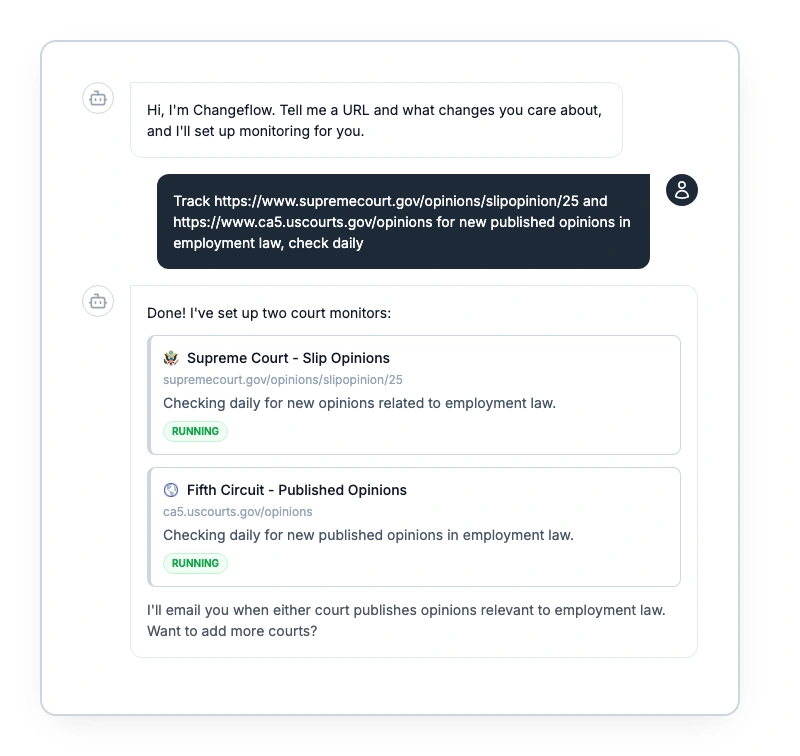
Step 3: Fill the gaps with a website monitor. For court pages without built-in alerts, use a change detection tool. Point it at the opinion page URL, tell it what you care about (new opinions in employment law, new Fifth Circuit published decisions, changes to standing orders), and it will check the page on a schedule and alert you when something new appears.
Step 4: Set up AI filtering. Raw change alerts from court websites get noisy. An opinions page might show 20 new decisions in a week, and you care about 2. Tools with AI filtering, like Changeflow, let you describe your practice area in plain English. The AI reads each new opinion listing and only alerts you to decisions relevant to your brief.
Step 5: Route alerts to the right people. Court monitoring isn't just for attorneys. Law librarians running current awareness, paralegals, and compliance teams all benefit from different court content. Route opinion alerts to practice group leads, rule change alerts to the managing partner, and procedural updates to paralegals.
Building a Court Monitoring Workflow
The firms that do this well don't just turn on alerts and hope for the best. They build a system.
Assign court monitoring by practice area. Each practice group should own a set of courts. Your employment team watches the circuit courts and state courts that generate employment decisions. Your IP team watches the Federal Circuit and PTAB. Your regulatory team watches administrative courts and agency adjudications.
Review cadence matters. Daily review for high-volume courts (your primary circuit, your state supreme court). Weekly review for secondary jurisdictions. Immediate alerts for your specific tracked cases through docket tools.
Connect monitoring to research workflows. When a new opinion hits, it should flow into your knowledge management system. Tag it. Route it to relevant attorneys. Add it to your brief bank if it's useful. The monitoring is only valuable if the knowledge reaches the people who need it. Teams that also need to preserve what they find should pair monitoring with website archiving for compliance to build a defensible evidence trail.
Don't forget judge-specific pages. If you're appearing before a judge next month, monitor their individual page for changes to standing orders, scheduling preferences, or procedural requirements. This is the kind of regulatory intelligence that wins cases by preparation, not argument.
For teams already maintaining regulatory compliance across multiple jurisdictions, court monitoring is a natural extension. The same workflow that tracks agency rule changes can track judicial decisions that interpret those rules. PACER provides federal docket access (paid per page), CourtListener offers free RSS feeds for many federal courts, and automated page monitoring covers the local court bulletin boards and standing orders that neither covers reliably.
Frequently Asked Questions
How do I get alerts for new court opinions?
It depends on the court. Some federal courts offer RSS feeds, and CourtListener provides free alerts for opinions across hundreds of jurisdictions. For courts that don't offer built-in alerts, website monitoring tools like Changeflow can track opinion pages and notify you when new content appears, with AI filtering for your practice area.
What is the difference between docket alerts and court website monitoring?
Docket alerts track activity on specific cases you already know about, like new filings or status changes in PACER. Court website monitoring tracks the pages themselves for any new content, including opinions, rule changes, administrative orders, and notices you wouldn't find through docket systems. They solve different problems.
Can I monitor state court websites for new opinions?
Yes. Most state supreme courts and appellate courts post opinions on their websites before they appear in legal databases. CourtListener covers many state jurisdictions. For courts not covered by docket tools, a website change tracker can monitor the opinion page directly and alert you when new decisions post.
What court websites should law firms monitor?
Start with courts in your jurisdiction and practice area. Track the opinion pages of your state supreme court, relevant federal circuit courts, and any specialty courts like Tax Court or bankruptcy courts. Also monitor local rules pages, standing orders from judges you appear before, and clerk office notices for procedural changes.
Is there a free way to monitor court websites?
CourtListener from the Free Law Project is free and covers millions of opinions across federal and state courts. PACER offers RSS feeds for individual courts. Google Alerts catches some court news. For monitoring specific court web pages that these tools don't cover, Changeflow offers a free trial with AI-powered change detection.
Track court websites automatically
Get alerts when new opinions drop, rules change, or courts post updates. AI reads the page and tells you what matters.
Try Changeflow FreeNo credit card required
More from Learn

Wayback Machine for Legal Research: A Law Librarian's Guide
Half the URLs in old briefs are dead. Here is how law librarians use the Wayback Machine and stronger archives to verify citations, build timelines, and support litigation.

Law Librarian Current Awareness Audit Checklist (2026)
A 27-question audit covering coverage, cadence, relevance, distribution, resilience, and value. Built for law librarians and knowledge lawyers running current awareness at Am Law 200 firms.

Audit-Ready Web Archives: SEC 17a-4, FDA, and HIPAA Rules
Free archive tools fail under regulatory audit. Here is what SEC 17a-4, FDA 21 CFR Part 11, and HIPAA require from a web archive that holds up under examination.