Wayback Machine missing pages or too slow? 12 alternatives that archive, monitor, and track website changes. Free, paid, and self-hosted options.

The Wayback Machine is incredible. Free access to billions of archived web pages going back to 1996. But it's not perfect.
Sometimes pages aren't archived. Sometimes the archive is months old. Sometimes you need features it doesn't have, like automatic monitoring, legal-grade timestamps, or private archives.
That's where alternatives come in. This guide covers the best Wayback Machine alternatives for different needs: research, business compliance, legal evidence, and personal use. Also see our guides on Archive.is alternatives and Internet Archive alternatives for more options.
Quick Comparison
| Tool | Price | Best For | Key Difference |
|---|---|---|---|
| Archive.today | Free | Research | On-demand snapshots |
| Changeflow | From $99/mo | Business | Automatic monitoring + AI |
| CachedView | Free | Quick lookups | Aggregates multiple caches |
| Google Cache | Free | Recent pages | Google's crawl cache |
| Stillio | From $29/mo | Screenshots | Scheduled captures |
| PageFreezer | Enterprise | Legal/compliance | Court-admissible |
| Conifer | Free/paid | Interactive | Captures dynamic sites |
| HTTrack | Free | Offline copies | Downloads full sites |
| Perma.cc | Free (limited) | Academic citations | Permanent links |
| ArchiveBox | Free (self-host) | Personal archives | Your own Wayback |
| Webrecorder | Free | Dynamic content | Browser-based capture |
| Time Travel | Free | Research | Searches multiple archives |
Paste a URL. We'll do the rest.
Changeflow monitors the page and tells you what changed and why it matters.
Free plan available. No credit card required.
For Research and Casual Use
1. Archive.today (archive.is)
Price: Free Best for: On-demand page archiving
Archive.today (also known as archive.is, archive.ph) lets you save snapshots of web pages on demand. Unlike Wayback Machine which crawls automatically, you request specific pages to archive.
Strengths: Instant archiving of any public page, removes ads and tracking, clean readable archives, multiple domain mirrors.
Limitations: Manual process (you request each save), some sites block it, no automatic monitoring, no organization or folders.
Use it when: You need to save a specific page right now and want it preserved permanently.
2. CachedView
Price: Free Best for: Finding any available cache
CachedView aggregates cached versions from multiple sources: Google Cache, Wayback Machine, and others. Enter a URL and it shows you all available cached versions.
Use it when: A page is down and you need to find any available cached version quickly.
3. Google Cache
Price: Free Best for: Recent page versions
Google keeps cached copies of pages it crawls. Access by searching for a URL and clicking "Cached" or using cache:example.com in Google search.
Strengths: Often has recent versions (days old), fast and reliable.
Limitations: Only keeps one version (most recent crawl), Google is removing this feature gradually, no history or comparison.
For Business and Compliance
4. Changeflow
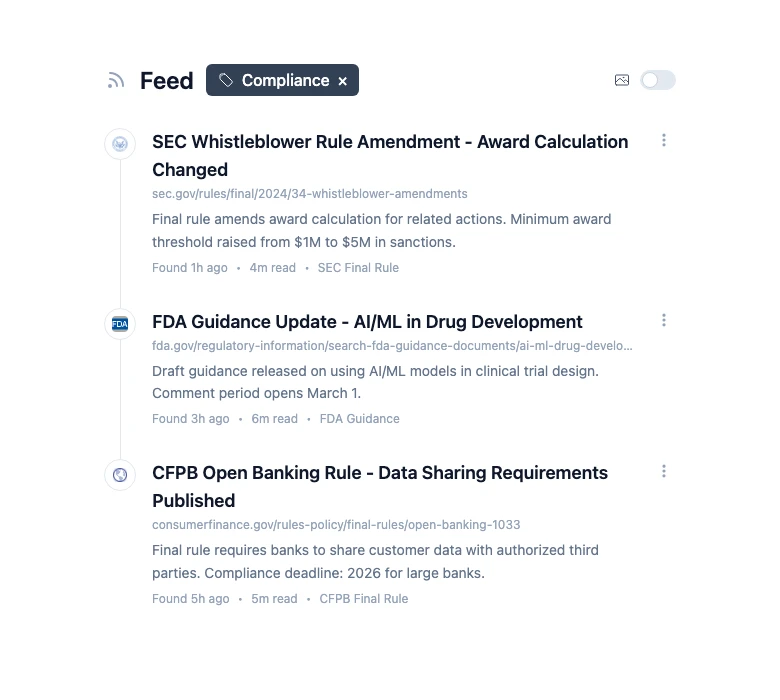
Price: Free (3 sources) | Pro $99/mo | Business $249/mo | Enterprise custom Best for: Business monitoring and compliance
Changeflow automatically monitors websites and archives every version it detects. Unlike Wayback Machine which archives occasionally, Changeflow checks on your schedule and alerts you to changes.
Strengths:
- Automatic monitoring (set it and forget it)
- AI summarizes what changed
- Timestamped archives with screenshot proof
- Works on JavaScript-heavy sites and SPAs that Wayback struggles with
- Change alerts via email, Slack, webhooks
- Organized by project/client
Limitations:
- Paid for serious use
- Archives start when you set up tracking (not historical)
- Not a public archive
Use it when: You need to monitor competitor websites, track regulatory changes, or maintain compliance archives for your business.
5. PageFreezer
Price: Enterprise (contact for pricing) Best for: Legal and regulatory compliance
PageFreezer creates legally defensible website archives. Used by legal teams, compliance departments, and government agencies who need court-admissible evidence.
Strengths: Court-admissible archives, chain of custody documentation, social media archiving, eDiscovery integration, SOC 2 certified.
Limitations: Enterprise pricing, overkill for casual use, complex implementation.
Use it when: You need website archives that will hold up in court or regulatory proceedings. Compliance teams comparing vendors should see our checklist on audit-ready web archives for what SEC 17a-4, FDA, and HIPAA examiners actually require.
6. Stillio
Price: Basic $29/mo | Plus $59/mo | Pro $99/mo Best for: Scheduled screenshots
Stillio takes automated screenshots of websites on a schedule. It's focused on visual capture rather than content archiving.
Use it when: You specifically need visual screenshots on a schedule, not content monitoring.
For Academic and Research
7. Perma.cc
Price: Free (10 links/mo) | Paid plans for more Best for: Academic citations
Perma.cc was built by Harvard Law School Library to solve link rot in academic citations. When you cite a web source, Perma creates a permanent archive that won't disappear.
Use it when: You're writing academic papers or legal documents and need permanent links to sources. For the broader law-firm workflow, see our guide on the Wayback Machine for legal research for when each archive type fits which legal task.
8. Conifer (formerly Webrecorder)
Price: Free (5GB) | Paid plans for more storage Best for: Capturing interactive content
Conifer captures interactive, dynamic websites that other archivers miss. It records your browsing session, preserving JavaScript-heavy pages as you experience them.
Use it when: You need to archive JavaScript-heavy pages or social media content that Wayback Machine can't capture properly.
For Self-Hosting and Technical Users
9. ArchiveBox
Price: Free (open source) Best for: Personal/organizational archives
ArchiveBox is an open-source tool that creates your own personal Wayback Machine. You host it yourself and control your archive completely.
Strengths: Full control over your data, multiple archive formats (HTML, PDF, screenshot, etc.), self-hosted privacy.
Limitations: Requires technical setup, you manage hosting/storage, no support (community only).
10. HTTrack
Price: Free (open source) Best for: Downloading entire websites
HTTrack downloads complete websites for offline viewing. It's not an archive service but a website copier. Been around forever and reliably downloads full sites for offline access.
11. Time Travel (timetravel.mementoweb.org)
Price: Free Best for: Finding archives across services
Time Travel searches multiple web archives simultaneously. Enter a URL and see archived versions from Wayback Machine, Archive.today, and other archives in one timeline.
12. Webrecorder
Price: Free Best for: Browser-based dynamic content capture
Webrecorder captures websites exactly as you browse them, preserving interactive elements that static archivers miss.
Why People Look for Wayback Machine Alternatives
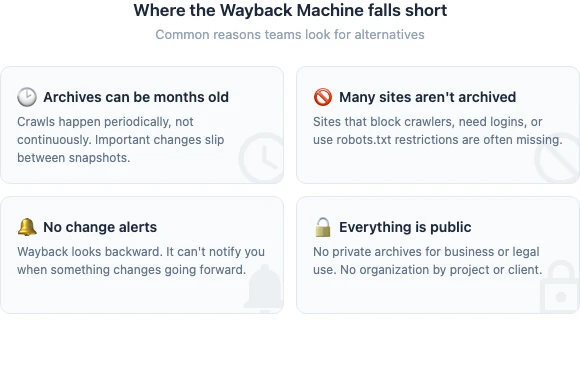
Coverage gaps: Not every site is archived. Sites that block crawlers, require login, or have robots.txt restrictions often aren't in Wayback.
Timing: Wayback archives pages periodically, not continuously. An important change might happen between crawls and never be captured.
No monitoring: Wayback is for looking back, not watching forward. If you need to know when something changes, you need a tool that tracks changes.
No private archives: Everything in Wayback is public. If you need private archives for business or legal purposes, you need an alternative.
No organization: Wayback stores everything in one giant archive. No folders, tags, or project organization.
Which Alternative Should You Use?
For casual research: Start with Wayback Machine and Archive.today. They're free and cover most needs.
For business monitoring: Use Changeflow. It watches websites automatically and tells you when things change, with organized archives. Financial teams use it for SEC filing monitoring and regulatory change tracking.
For legal compliance: Use PageFreezer if you need court-admissible archives with chain of custody. See our guides on eDiscovery website evidence, court website monitoring, and website archiving for compliance.
For academic work: Use Perma.cc to create permanent citation links.
For technical users: Set up ArchiveBox for a self-hosted solution you control completely.
Start Archiving What Matters
The Wayback Machine is great for looking at the past. But for business, you need to watch the present.
Changeflow monitors websites automatically and archives every version. When something changes, you know immediately. No more checking manually. No more hoping Wayback captured it. From tracking government websites to maintaining regulatory compliance, it handles what Wayback was never built for.
Monitor websites and archive changes
Changeflow watches websites and archives every version. Know when something changes.
Try Changeflow FreeNo credit card required
More from Learn

Wayback Machine for Legal Research: A Law Librarian's Guide
Half the URLs in old briefs are dead. Here is how law librarians use the Wayback Machine and stronger archives to verify citations, build timelines, and support litigation.
Law Librarian Current Awareness Audit Checklist (2026)
A 27-question audit covering coverage, cadence, relevance, distribution, resilience, and value. Built for law librarians and knowledge lawyers running current awareness at Am Law 200 firms.
Audit-Ready Web Archives: SEC 17a-4, FDA, and HIPAA Rules
Free archive tools fail under regulatory audit. Here is what SEC 17a-4, FDA 21 CFR Part 11, and HIPAA require from a web archive that holds up under examination.