Courts reject website screenshots without proper authentication. Learn how to capture, preserve, and authenticate web evidence that holds up in litigation.

eDiscovery Website Evidence
A contract dispute goes to trial. Your key evidence? A webpage the opposing party changed six months ago. You have a screenshot from your associate's laptop. The judge asks: when was this captured? By whom? Can you prove it hasn't been altered?
You can't. The evidence gets excluded.
This happens more often than law firms expect. eDiscovery website evidence sits in a tricky category: it's clearly ESI under the Federal Rules, but capturing it in a legally defensible way requires more than hitting Print Screen. And unlike emails sitting on a server, website archiving for compliance is a fundamentally different problem because pages change without notice.
In this guide, you'll learn:
- What courts require for website evidence authentication
- Why screenshots fail under FRE 901 and what works instead
- How FRE 902(13) changed the game for automated web capture
- A practical approach to preserving third-party website evidence
What Counts as Website Evidence in eDiscovery
Website content qualifies as electronically stored information (ESI) under the Federal Rules of Civil Procedure. That includes the visible page, but also everything behind it: HTML source, metadata, timestamps, server headers, and URL history.
Courts recognize several categories of web evidence:
- Published web pages: product claims, terms of service, pricing, regulatory guidance
- Social media posts: public statements, employee communications, customer complaints
- Government agency pages: regulatory notices, enforcement actions, guidance updates
- Competitor websites: advertising claims, feature comparisons, pricing changes
- Forum and review content: consumer complaints, expert discussions, product reviews
The critical thing: websites are not static documents. They change without notice, without version history, and without any obligation to preserve prior versions. That makes web evidence preservation a fundamentally different challenge from archiving emails or contracts.
Monitor regulatory pages automatically
Changeflow watches agency websites and tells you what changed and why it matters.
Free plan available. No credit card required.
Why Screenshots Get Thrown Out
Courts are raising the bar on digital evidence collection. A screenshot with a boilerplate attorney declaration is no longer enough.
In Disney v. Sarelli (2018), the court excluded screenshots accompanied by standard declarations because they lacked proper authentication. The court couldn't verify when the pages were captured, whether they accurately reflected the original content, or whether they'd been altered.
Under FRE 901, evidence must be shown to be "what its proponent claims it is." For website evidence, that means proving:
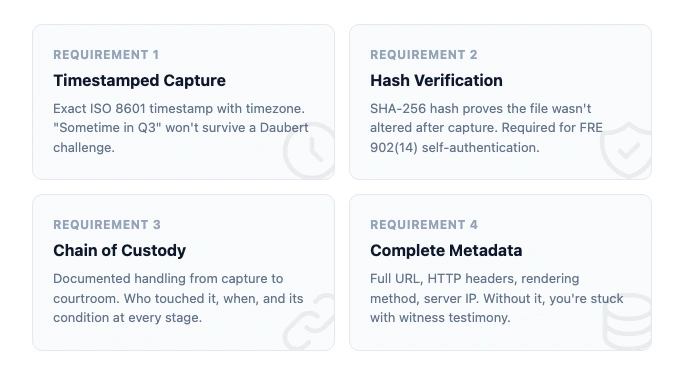
- When the page was captured (exact timestamp, not "sometime last month")
- How the capture was made (what tool, what process)
- That nothing changed between capture and presentation (integrity verification)
- What the original looked like (complete rendering, not a cropped window)
Screenshots fail on all four counts. They strip metadata. They lack hash values. They show only what the person chose to capture. And there's no chain of custody connecting the screenshot file to the original webpage.
The landmark case here is Lorraine v. Markel American Insurance Co. (2007), where Judge Grimm wrote a 100-page opinion establishing the framework for ESI authentication. That framework still gets cited today. It's clear: you need more than a picture of a screen.
Four Authentication Methods Under FRE 901(b)
The rules give you four ways to authenticate website evidence. Each has tradeoffs.
Witness testimony (901(b)(1)). Someone with personal knowledge testifies they visited the URL at a specific time and the exhibit reflects what they saw. This works but it's expensive. You need a live witness for every piece of web evidence, and their memory of "what the page looked like" is inherently questionable.
Distinctive characteristics (901(b)(4)). The evidence itself contains features that prove authenticity: URLs, timestamps, formatting consistent with the source. Metadata-rich captures satisfy this standard. Plain screenshots usually don't.
Expert comparison (901(b)(3)). A digital forensics expert compares the exhibit against known samples. Rarely used for routine web evidence because expert testimony is costly. Common in high-stakes IP and fraud cases.
Process or system evidence (901(b)(9)). You show that the capture system produces accurate results. This is the most scalable method. If your tool automatically captures pages with SHA-256 hashes and complete metadata, you authenticate the process once and it covers every capture.
That last method is where compliance monitoring tools and automated change detection create real value. Instead of authenticating each screenshot individually, you authenticate the system.
FRE 902(13): Self-Authenticating Web Evidence
In December 2017, the Federal Rules of Evidence added Rule 902(13). It lets records generated by an electronic process or system self-authenticate through a written certification. No live witness required.
What that means in practice: if your web capture tool generates a hash value for every page it archives, and you can certify how the tool works, that evidence is self-authenticating. The opposing party can still challenge it, but the burden shifts to them.
This is a significant development for firms doing court website monitoring or tracking regulatory changes. A system that automatically captures pages with cryptographic verification creates evidence that walks into court on its own.
The requirements for 902(13) certification:
- Description of the electronic process or system
- Proof that the process produces accurate results
- Written certification by a qualified person
- Notice to opposing party at least 14 days before trial
Rule 902(14) adds a parallel path: evidence authenticated by digital identification (hash values) can be self-authenticating with proper certification. Together, these rules give automated web capture tools a clear path to admissibility.
Spoliation: When Website Evidence Disappears
Website evidence is uniquely vulnerable to spoliation. Pages get updated. Content gets removed. Redesigns wipe entire sections. And unlike email servers with retention policies, most websites keep no history at all.
Under FRCP 37(e), courts can impose sanctions when a party fails to preserve ESI that should have been kept. Those sanctions range from requiring the party to pay for recovery efforts to instructing the jury to assume the destroyed evidence was unfavorable.
Three types of spoliation courts recognize:
- Intentional: deliberately deleting or altering web content after litigation is anticipated
- Negligent: failing to preserve content despite knowing it could be relevant
- Reckless: conscious disregard of the duty to preserve
The duty to preserve kicks in when litigation is "reasonably anticipated," not when papers are filed. For firms tracking government website changes through compliance monitoring, that window can open months or years before any suit. Automated page monitoring captures agency content as it changes, with timestamps, so litigation teams have an evidentiary trail rather than scrambling to reconstruct what existed before.
Here's the problem with third-party websites: you can't issue a litigation hold to someone else's web server. If a competitor changes their advertising claims, a regulator removes guidance, or an opposing party updates their terms of service, that content is gone unless you captured it first.
Proactive monitoring beats reactive archiving every time. You can't preserve what you didn't capture.
Building a Defensible Web Evidence Practice
The gap between "take a screenshot" and "defensible digital evidence" is wide. Here's how to close it.
Automate Capture Before You Need It
The worst time to start preserving website evidence is after litigation is anticipated. By then, the pages you need may have already changed. Firms doing law firm website monitoring as standard practice capture changes as they happen, building an evidence archive before any dispute arises. The library is often where this lands: law librarians already monitor agency pages for current awareness, so extending that into a litigation-ready archive is a short step.
Require Metadata on Every Capture
Every web evidence record should include:
- Exact timestamp (ISO 8601 format, with timezone)
- Full URL (including query parameters and fragments)
- HTTP response headers (server, content-type, last-modified)
- SHA-256 hash of the captured content
- Rendering method (browser engine, viewport size, JavaScript execution status)
Without this metadata, you're relying on witness testimony for authentication. With it, you're eligible for 902(13) self-authentication.
Use Tools That Produce Court-Ready Output
Wayback Machine alternatives vary widely in how they handle evidence requirements. Some produce simple screenshots. Others generate WARC files with full metadata and hash verification. Free on-demand tools like the archive.is alternatives covered elsewhere capture point-in-time snapshots, but most lack the audit trail and chain of custody that 902(13) self-authentication requires.
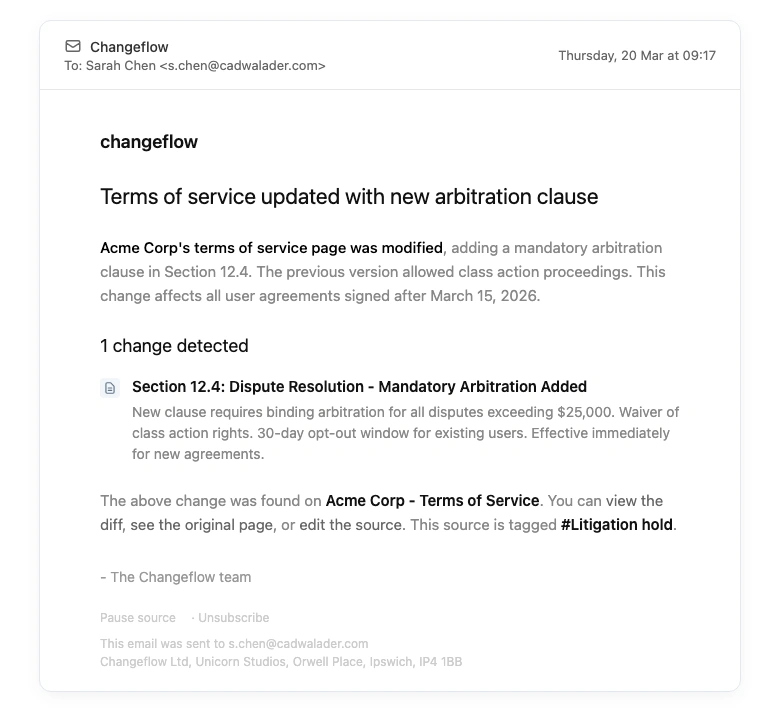
Changeflow captures every tracked page with timestamps and full change history. When a page changes, you get the before and after states. That continuous record is exactly what website change detection was built for, and it creates the kind of timestamped evidence trail that satisfies 901(b)(9) process authentication.
Document Your Process
Courts evaluating 901(b)(9) and 902(13) authentication want to see a documented process. Write down:
- What tool you use and how it captures pages
- How often captures occur (daily, hourly, on-change)
- Where captures are stored and who has access
- How integrity is verified (hash comparison)
- How long records are retained
This document becomes your certification basis under 902(13). Create it once, update it as your process changes.
Common Mistakes That Get Evidence Excluded
Based on case law and the strict approach courts increasingly take:
- Capturing too late. The page changed before you got to it. Proactive regulatory intelligence monitoring prevents this. Teams maintaining regulatory compliance already have systems that catch changes as they happen.
- No hash verification. Without SHA-256 or equivalent, you can't prove the file wasn't altered after capture.
- Missing timestamps. "I took this screenshot sometime in Q3" won't survive a Daubert challenge.
- Incomplete captures. Cropped screenshots that don't show the full URL, page title, or surrounding context.
- No process documentation. Under 902(13), the certification must describe how the system works. No documentation, no self-authentication.
- Relying solely on third-party archives. The Wayback Machine is useful but incomplete, and courts treat its content as hearsay.
Law firms that track website changes automatically avoid most of these pitfalls by default. The system handles timestamps, metadata, and change history. You just need to document the process.
Frequently Asked Questions
Are website screenshots admissible as evidence?
Courts increasingly reject plain screenshots. In Disney v. Sarelli (2018), screenshots with boilerplate attorney declarations were excluded. Courts now expect metadata, hash values, and a documented capture process under FRE 901 and 902(13). The trend is toward stricter authentication requirements for all digital evidence.
What is spoliation of website evidence?
Spoliation is the destruction or alteration of evidence relevant to litigation. Website content is especially vulnerable because pages change constantly without notice. Under FRCP 37(e), courts can impose sanctions including adverse inference instructions when parties fail to preserve relevant web content they had a duty to keep.
How do you authenticate website evidence for court?
Under FRE 901(b), you can authenticate web evidence through witness testimony, distinctive characteristics like metadata, or process evidence showing how the capture system works. FRE 902(13) allows self-authentication via certification when using automated capture tools with hash verification. The process method scales best across large evidence sets.
Can you use the Wayback Machine as legal evidence?
Courts have accepted Wayback Machine evidence with significant caveats. It requires authentication by someone with knowledge of the archive, captures are incomplete and sporadic, and content is treated as hearsay. It's useful for proving a page existed at a point in time but not for establishing the truth of its content. The EDRM recommends supplementing with more complete capture tools.
How do you preserve third-party website evidence?
You cannot force a third party to preserve their website. Legal holds only apply to your own organization's data. The only reliable approach is proactive monitoring that captures pages before they change. Changeflow tracks website changes automatically and preserves timestamped records with every update, so evidence exists before you know you need it.
Preserve website evidence automatically
Changeflow captures web pages with timestamps and metadata. Build a defensible evidence trail without manual screenshots.
Try Changeflow FreeNo credit card required
More from Learn

Wayback Machine for Legal Research: A Law Librarian's Guide
Half the URLs in old briefs are dead. Here is how law librarians use the Wayback Machine and stronger archives to verify citations, build timelines, and support litigation.

Law Librarian Current Awareness Audit Checklist (2026)
A 27-question audit covering coverage, cadence, relevance, distribution, resilience, and value. Built for law librarians and knowledge lawyers running current awareness at Am Law 200 firms.
Audit-Ready Web Archives: SEC 17a-4, FDA, and HIPAA Rules
Free archive tools fail under regulatory audit. Here is what SEC 17a-4, FDA 21 CFR Part 11, and HIPAA require from a web archive that holds up under examination.