BEYOND SCREENSHOTS
Visualping Alternative:
An AI agent that reads, explores & answers
Comparing Visualping vs Changeflow? Visualping takes screenshots. Changeflow sends an AI agent. It reads pages, follows links to discover new content, and lets you ask questions about what changed. 'What does this pricing update mean for us?' Get real answers, not red boxes.
Why choose Changeflow?
| Changeflow | Visualping | |
|---|---|---|
| Built for business | ||
| AI you can talk to | ||
| Follows links & discovers new pages | ||
| AI summarized alerts | ||
| Visual highlighting | ||
| AI setup & filtering | ||
| Unlimited checks | ||
| Real-browser rendering for complex pages | ||
| Intelligence feeds | ||
| Monitor large PDFs | ||
| 1500 pages & dedicated support | $279/mo | $750/mo |
What is Visualping?
Visualping is a website change detection tool that monitors web pages by taking screenshots and comparing them over time. When the visual appearance of a page changes, Visualping highlights the differences with red boxes and sends email alerts. Founded in 2016 in Vancouver, Visualping started as a consumer tool for personal use cases like tracking product prices and availability. While they've added business features over time, the product's DNA remains consumer-focused.
Visualping works well for simple visual monitoring, but has limitations for business users:
- Screenshot-based detection that shows what changed visually, but not what it means
- Per-check pricing where costs scale with monitoring frequency
- No AI filtering, so every change triggers alerts, including irrelevant ones
- Single URL monitoring that doesn't follow links or discover new content
From setup to intelligence on auto-pilot in 60 seconds
A URL and brief description of what you care about is all you need.
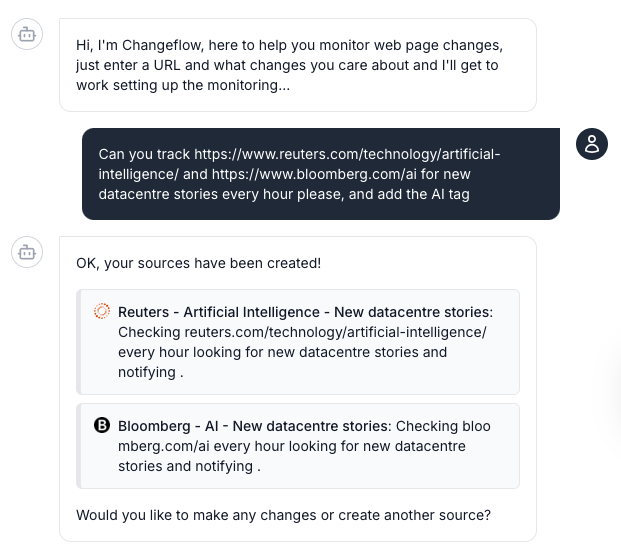
1. Describe what matters
Tell our AI agent what URLs to monitor and a brief description of what updates you want to be told about. No technical setup or manual configuration required.
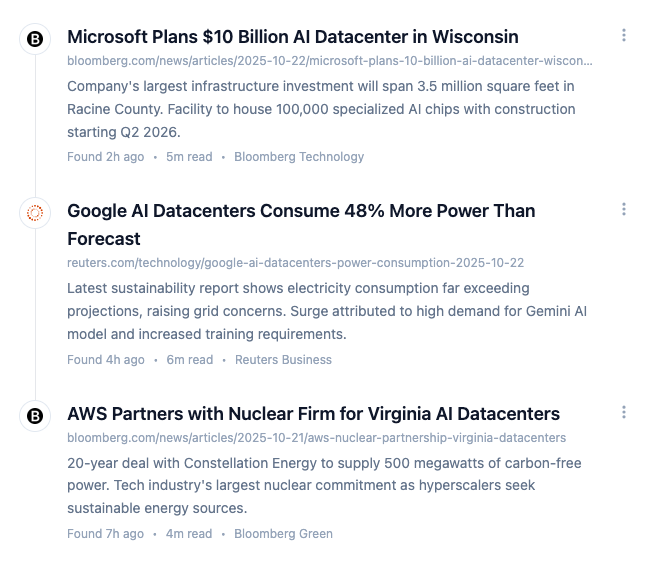
2. Let our AI agent track the pages
The platform navigates to pages, checks for updates and uses AI to determine the relevance of the changes. Your personalized feed surfaces only what matters.
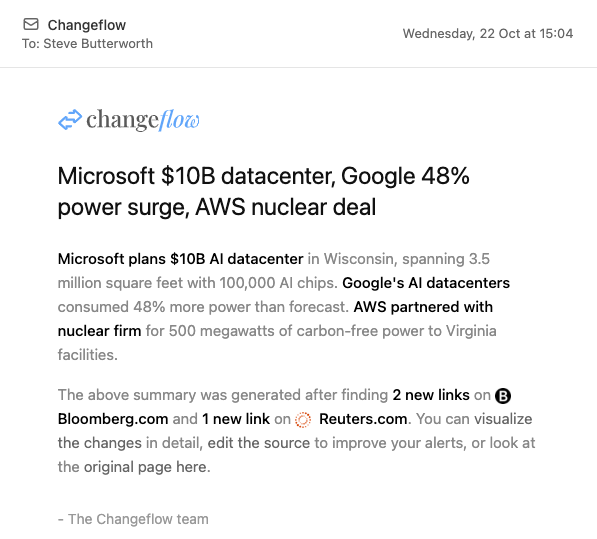
3. Stay informed
Get clear summaries as soon as changes happen, explaining the updates and why they matter. Timely intelligence delivered straight to your inbox or feed.
What is the Best Visualping Alternative?
Changeflow. Where Visualping shows you red boxes around what changed, Changeflow tells you what it means. Our AI reads the page, follows links to discover new content, and lets you ask questions about the changes. Plus unlimited checks and flat pricing. Trusted by Fortune 500, Big 4, and Am Law 200 teams.
Why Teams Switch from Visualping to Changeflow
Most teams outgrow Visualping when they need more than a camera pointed at one page.
1. Built for Business From Day One
Visualping started as a consumer tool for tracking price drops and concert tickets. It shows. Changeflow was built for enterprise teams from the start. Compliance workflows, team collaboration, audit trails, SSO. The things businesses actually need, not bolted-on afterthoughts.
2. It Explores, Not Just Watches
Visualping monitors one URL. That's it. Changeflow follows links, discovers new content, and reads what it finds. Point it at a competitor's newsroom and it'll find new press releases before they hit RSS, read them, and tell you what matters. Like having a researcher who actually clicks around.
3. AI You Can Actually Talk To
Visualping sends you an alert. Changeflow lets you ask questions. "What does this pricing change mean for our positioning?" "How does this compare to last quarter?" It's not just monitoring. It's an AI agent that understands your context and gives you real answers.
4. Know What Changed, Not Just That Something Changed
Visualping shows you a red box. Changeflow tells you what it means. Our AI reads the page and summarizes: "Competitor raised enterprise pricing by 15%." No more squinting at screenshots trying to spot the difference.
5. Unlimited Checks. Flat Pricing.
Visualping charges per check. Monitor 100 pages every 5 minutes and your bill explodes. Changeflow? Unlimited checks on every plan. Monitor as often as you want. Same price.
6. Support That Gets It
Monitoring 500+ pages for a Fortune 500 compliance team? We've done that. Our team has helped legal librarians at Am Law 200 firms, regulatory affairs teams at Fortune 500 pharma companies, and compliance officers at major banks. Real people who understand your use case.
When Visualping Might Be the Right Choice
We believe in recommending the right tool for the job. Visualping may be better if:
- You need purely visual comparison. If you specifically need to see pixel-level visual differences (like monitoring design changes), Visualping's screenshot approach is purpose-built for this.
- You're monitoring just a few personal pages. Visualping's free tier (5 pages) works well for personal price tracking or availability alerts.
- You prefer visual highlighting over text summaries. Some users prefer seeing exactly what changed visually rather than reading an AI summary.
Choose Changeflow if: You need AI-powered intelligence, unlimited checks, an AI you can talk to, or you're monitoring for business purposes where understanding context matters more than seeing pixel differences.

"Changeflow is an awesome tool, we've tried all of the alternatives and at last we have found something that just works! We use the chatbot to add multiple pages at a time, so quick and easy."
Rachel White
Director, Working Planet
The Changeflow advantage
AI-powered intelligence
Our AI understands what matters to you and filters out irrelevant changes. No more wasting time on false positives or noise.
Natural language setup
No RSS feeds or manual configuration. Just describe what you want to track in plain English and we handle the rest.
Intelligent summarization
Don't waste time reading full pages. Get AI-generated summaries of what changed and why it matters to your business.
Multi-source aggregation
Track any online source in one unified feed. Web pages, PDFs, XML feeds, and more, all monitored in one place.
Self-healing monitoring
When a page structure changes, Changeflow automatically detects and re-evaluates how to monitor it. No broken monitors, no manual reconfiguration.
Ten years of reliability
Built on a decade of monitoring. The boring parts (uptime, retries, freshness) are solved, so you focus on what changed.
Visualping vs Changeflow FAQ
What is the best Visualping alternative?
Changeflow. Where Visualping shows you red boxes around what changed, Changeflow tells you what it means. Our AI reads the page, follows links to discover new content, and lets you ask questions about the changes. Plus unlimited checks and flat pricing. Trusted by Fortune 500, Big 4, and Am Law 200 teams.
Can you talk to Changeflow's AI about website changes?
Yes. Unlike Visualping which just shows screenshots, Changeflow has an AI you can actually talk to. Ask questions like 'What does this pricing change mean for our positioning?' or 'How does this compare to last month?' The AI understands context and gives real answers, not just alerts.
Does Changeflow follow links and discover new pages?
Yes. Visualping only monitors the single URL you give it. Changeflow follows links, discovers new pages, and reads what it finds. Point it at a competitor's blog or newsroom and it'll find new posts before they hit RSS and tell you what matters. It's like a researcher who actually clicks around.
What's the difference between Changeflow and Visualping?
Visualping takes screenshots and highlights differences with red boxes. Changeflow reads the page, follows links to find new content, and tells you what changed in plain English. "Competitor raised prices 15%" beats "see red box in pricing section." You can also ask our AI questions about the changes.
Is Changeflow cheaper than Visualping?
For business use, usually 50-70% cheaper. Visualping charges per check. Monitor 100 pages every 5 minutes and costs add up fast. Changeflow is flat pricing with unlimited checks. $14/month gets you everything. No surprises on your bill.
Can I import my Visualping monitors to Changeflow?
Yes. Free migration. Export your Visualping list, send it over, and we'll set everything up within 24 hours. Our AI configures the monitoring rules automatically. You get 30 days free to make sure it all works before you commit.
What can Changeflow do that Visualping can't?
Follow links and discover new pages automatically. Ask questions about your changes in natural language. Get AI summaries that explain what changed. Unlimited checks without per-check fees. Natural language setup. Real enterprise support. Built for business use cases like compliance, competitive intel, and legal research.
Does Changeflow work like Visualping?
Same goal, different approach. Visualping compares screenshots. Changeflow reads the page, follows links to new content, and uses AI to figure out what actually changed and whether you should care. Less noise. Smarter alerts. Plus an AI you can actually talk to.
Free Migration from Visualping
Switching from Visualping? We'll migrate your monitors for free.
What's Included:
- Export your Visualping monitor list (we'll show you how)
- Our team imports all URLs into Changeflow
- AI automatically configures monitoring rules based on your use case
- 30-day free trial to test everything before committing
Ready to switch?
Plans from $99/mo. Free 30 day trial on every plan. No credit card required.
Frequently asked questions
If you can't find what you're looking for, email our support team and we'll get back to you with answers quickly.
-
-
What sources can I use?
Anything you find online is readable by changeflow including web pages, sitemaps, RSS, text files, JSON, CSVs and PDFs.
-
Can I pay for my subscription via PO?
Yes, please get in touch with support and we'll get this sorted for you. We can currently only offer this for annual enterprise licenses.
-
How do you decide what a useful change is?
Our app uses a combination of algorithms honed over 10 years of change detection along with giving your prompt to state of the art AI models to decide what changes on the page are important to you.
-
Do you have location proxies?
Yes. By default changeflow will choose a sensible country proxy based on the customer location. For instance if you are in the US it will by default use a US based proxy.
-
-
-
Can you detect changes that are not visible?
By default we detect visible changes but if you specify in your prompt you are interested in hidden changes too then these will also be tracked.
-
What about pages behind a login?
We can work with those too. We want to keep your credentials secure so please get in touch if you want to do this and we'll help you set it up.
-
Can I see the changes highlighted visually?
Yes. Even though we don't rely on visual comparison to detect changes we know it can be useful to visually compare the old and new pages and see changes highlighted.
-
What about slow loading content on pages?
Our algorithm figures out pages that progressively load content and learns to wait longer to make sure all content is loaded before checking for changes on these types of pages.
-
-
-
What if sources aren't working as expected?
Our team can usually troubleshoot any stubborn sources and get them working for you, just let us know what you need and we'll get it sorted.
-
How frequently do you check pages?
You can describe the frequency e.g. "hourly", "every 6 hours", "every 2 hours on weekdays", "daily at 8am", "Wednesdays at 9am".
-
How do notifications work?
The easiest way to get notifications is to set an email address or multiple email addresses for each source. Then when a change is detected you will get email notifications to those addresses.
-
Can we get a longer trial?
If you have a real business use case and pages just don't change often enough to make good use of our 30 day free trial we can extend the trial period. Just let us know and we'll get you set up.
-
START MONITORING IN 60 SECONDS
Switch from Visualping today
- 30-day free trial, no credit card required
- Setup takes 60 seconds with AI assistance
- Cancel anytime, no long-term contract
Questions? Our specialists are here to help, just email hello@changeflow.com