
How law firms use website monitoring to track courts, regulators, and competitors. Set up a legal monitoring program that catches changes before your clients do.

Website Monitoring for Law Firms
A partner at your firm finds out about an SEC guidance change from a client's email. Not from your compliance team. Not from your research department. From the client who expected you to already know.
This happens more than anyone admits. Regulatory agencies, courts, and legislatures publish changes on their websites. Sometimes with notice. Often without. And the firms that catch those changes first win the work.
Website monitoring for law firms solves this problem by automatically tracking online sources and alerting your team when something changes. Here's how to set it up, what to monitor, and how to avoid the common mistakes.
Why Law Firms Need Website Monitoring
Legal research databases cover statutes and case law well. Westlaw, LexisNexis, and Bloomberg Law are built for that.
But most of the changes that affect your clients happen somewhere else: on regulatory agency websites, in court docket entries, on state legislature portals, and across competitor firm announcements. This content sits outside traditional legal databases.
The American Bar Association reported that only 35% of firms have a systematic process for monitoring regulatory changes. The rest rely on individual attorneys checking their favorite sources, or worse, waiting for clients to bring changes to their attention.
That gap creates real risk. A missed regulatory compliance deadline can cost millions. A missed court filing can cost a case.
Monitor regulatory pages automatically
Changeflow watches agency websites and tells you what changed and why it matters.
Free plan available. No credit card required.
What to Monitor: Four Source Types
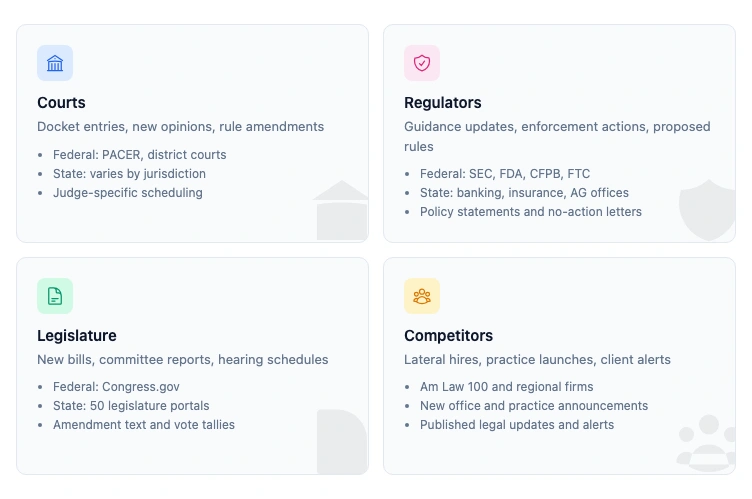
Every law firm monitoring program tracks some combination of these four categories. The mix depends on your practice areas.
Courts
Court websites publish docket entries, new opinions, rule amendments, and scheduling changes. Federal courts use PACER and individual district court sites. State courts vary wildly in how they publish online.
What to track:
- New opinions in your practice areas
- Docket updates on active cases
- Local rule changes
- Judge reassignments and scheduling orders
Regulators
Federal agencies like the SEC, FDA, CFPB, and FTC publish guidance documents, enforcement actions, proposed rules, and no-action letters on their websites. State regulators do the same at the state level.
What to track:
- Guidance updates and policy statements
- Enforcement actions and settlements
- Proposed rulemaking and comment periods
- Staff bulletins and interpretive letters
For agencies that publish them, free email subscriptions (Federal Register alerts, SEC RSS, FDA GovDelivery) give legal teams a baseline layer before adding paid monitoring for the long-tail pages those feeds miss.
Legislature
Federal and state legislative websites publish bill text, committee reports, hearing schedules, and vote records. Legislative tracking matters for any practice area that advises on compliance.
What to track:
- New bills introduced in relevant committees
- Amendment text and committee markup
- Hearing schedules and witness lists
- Vote tallies and enrollment status
Competitor Firms
Other law firms announce new partners, practice area launches, client wins, and thought leadership on their websites. Monitoring competitor websites helps you spot market moves early.
What to track:
- Partner and associate lateral announcements
- New practice area or office launches
- Published client alerts and legal updates
- Pricing and service offering changes
How Legal Website Monitoring Works
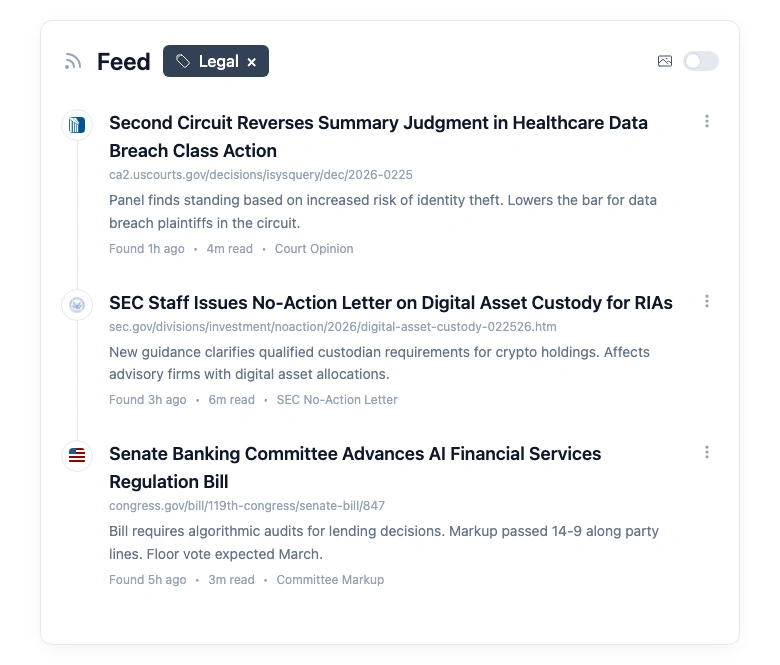
The basic mechanism is simple. You give a monitoring tool a list of URLs. It checks those pages on a schedule. When it detects a change, it alerts you.
The difference between tools is what happens between "detects a change" and "alerts you."
Basic tools send you every change, including navigation updates, footer edits, and cookie banner tweaks. You end up drowning in noise and ignoring the alerts entirely.
Better tools let you filter by keywords, specific page sections, or change magnitude. This cuts noise but still requires you to read every alert and decide if it matters.
The best tools use AI to read the change, compare it to what you told them you care about, and summarize the relevant parts. You get a clean summary instead of a raw diff.
For a law firm tracking 50+ sources across multiple practice areas, that difference between raw alerts and filtered intelligence is the difference between a useful tool and another inbox problem.
Five Practice Areas That Benefit Most
Website monitoring isn't equally valuable across every practice area. These five get the most out of it.
Securities and Capital Markets
SEC filings, EDGAR updates, staff guidance letters, and enforcement actions change how deals get structured. Missing a new no-action letter position or SEC filing update can mean giving clients outdated advice.
Healthcare and Life Sciences
FDA approvals, warning letters, clinical trial guidance, and CMS reimbursement policies shift constantly. Pharma clients expect their outside counsel to know about relevant FDA page changes before the general counsel's morning briefing.
Financial Regulatory
CFPB enforcement actions, OCC bulletins, Fed guidance, and state banking regulator updates affect every financial institution. The volume is enormous. One mid-size bank might need monitoring across 30+ regulatory sources. See our guide on regulatory change tracking for financial services for a deeper look at this use case.
Employment and Labor
DOL guidance, NLRB decisions, EEOC enforcement priorities, and state wage-and-hour updates affect every employer client. These changes happen at the federal, state, and local level simultaneously. Monitoring the OSHA website alone won't cut it when your client has employees in 15 states.
Litigation
Court docket tracking across active cases is the most immediate use. Litigation teams also need eDiscovery-grade website archives as evidence, plus monitoring of opposing counsel's published positions, judge-specific ruling patterns, and related cases that could affect strategy.
How to Choose a Monitoring Tool
Not every website monitoring tool works well for legal use. Here's what to evaluate.
Page coverage: Can it monitor government websites? Many tools choke on .gov sites that use older technology, PDFs, or JavaScript rendering. If a tool can't reliably fetch SEC.gov or your state court's website, it's useless for legal work.
AI filtering: Does it understand context, or does it just detect pixel changes? For legal monitoring, you need a tool that can tell the difference between a navigation redesign and a new enforcement action. Changeflow and a few others use AI to filter and summarize changes based on what you tell them matters.
Alert formats: Can it email a summary to a team distribution list? Can it post to Slack or Teams? Legal teams need to route different alerts to different practice groups.
Audit trail: For compliance purposes, you may need proof of when you first detected a change. Look for tools that timestamp every detection and keep a history of what changed.
Scale: Monitoring 5 pages is easy. Monitoring 500 across a multi-practice firm requires a tool built for that volume. Check pricing tiers and per-page limits before committing.
For a detailed comparison of the monitoring tools available, see our roundup of compliance monitoring software, competitive intelligence tools, and regulatory compliance examples from real legal teams.
Setting Up a Legal Monitoring Program
Here's a practical framework for getting started. You don't need to monitor everything at once.
Step 1: Audit Your Current Sources
List every website your attorneys currently check manually. Include regulatory agencies, courts, competitor firms, industry publications, and client-specific sources. Most firms are surprised to find they're manually checking 40-80 sources.
Step 2: Prioritize by Risk
Rank sources by two factors: how often they change, and how much a missed change costs. SEC guidance for a securities practice ranks higher than a competitor firm's blog. Regulatory change management starts with knowing where the risk is.
Step 3: Set Up Monitoring in Batches
Start with your top 10-15 highest-risk sources. Get the alert cadence and filtering right before adding more. Each source needs a brief description of what changes matter. "FDA drug approval updates" is better than "any change on fda.gov."
Step 4: Route Alerts to the Right People
A securities enforcement alert should go to your securities partners, not your employment group. Set up routing by practice area. Most firms use a shared channel per practice group plus direct email for urgent changes. This is where the law librarian's current awareness workflow earns its keep: one person curating the practice-group briefings rather than 500 raw alerts flying across the firm.
Step 5: Review and Expand Monthly
Check which alerts are getting read and which are getting ignored. Drop the noisy ones. Add new sources as practice needs evolve. A good monitoring program is never finished.
Common Mistakes Law Firms Make
Monitoring too many pages at once. Start with 10, not 100. Get the signal-to-noise ratio right first.
No filtering criteria. Telling a tool to "watch sec.gov" without specifying what you care about guarantees alert fatigue. Be specific: "New enforcement actions related to insider trading."
Ignoring state-level sources. Federal agencies get all the attention. But state regulators, state courts, and state legislatures produce the changes that affect most clients' day-to-day operations.
Not assigning ownership. If nobody is responsible for reviewing alerts, nobody will. Assign a point person per source category, with a backup.
Treating monitoring as a tech project. It's not an IT initiative. It's a client service capability. The partners who care about staying ahead for their clients should own this, not the IT department.
Getting Started
Your clients expect you to know about regulatory changes before they do. Manual checking doesn't scale. Legal research databases cover statutes and case law, but not the real-time agency updates, court website changes, and legislative shifts that drive advisory work. Many firms start with tracking government website changes and expand from there.
Pick your highest-risk sources. Set up monitoring. Route alerts to the right practice groups. Iterate.
The firms that monitor proactively win work. The firms that find out from clients lose it.
Track legal changes automatically
Monitor courts, regulators, and competitor firms. Get AI summaries when something changes.
Try Changeflow FreeNo credit card required
More from Learn

Wayback Machine for Legal Research: A Law Librarian's Guide
Half the URLs in old briefs are dead. Here is how law librarians use the Wayback Machine and stronger archives to verify citations, build timelines, and support litigation.

Law Librarian Current Awareness Audit Checklist (2026)
A 27-question audit covering coverage, cadence, relevance, distribution, resilience, and value. Built for law librarians and knowledge lawyers running current awareness at Am Law 200 firms.

Audit-Ready Web Archives: SEC 17a-4, FDA, and HIPAA Rules
Free archive tools fail under regulatory audit. Here is what SEC 17a-4, FDA 21 CFR Part 11, and HIPAA require from a web archive that holds up under examination.