
Compare 10 Amazon price tracker tools and apps for 2026. Track price history, set drop alerts, and find the lowest price before you buy.

Amazon changes prices roughly 2.5 million times per day. That headphone deal you saw at $79 this morning? It might be $94 by lunchtime. And back to $79 tomorrow.
Worse, 61% of Amazon products use inflated reference prices to make discounts look bigger than they are. That "Was $149, now $79" might mean the item has been $79 for months.
Price trackers cut through this. They record actual price history, set alerts at your target price, and tell you whether a deal is real. No more guessing. No more fake markdowns.
We compared the 10 best Amazon price tracker tools for 2026. Some are free browser extensions. Some are full-blown pricing platforms. One doesn't even require an install. Here's what actually works.
Quick Comparison
| Tool | Price | Type | Best For |
|---|---|---|---|
| CamelCamelCamel | Free | Web + Extension | Price history and alerts |
| Keepa | Free / €19/mo | Extension | Data-rich charts on Amazon |
| Honey | Free | Extension | Coupons + price drops |
| Capital One Shopping | Free | Extension + App | Price comparison across stores |
| Google Shopping | Free | Built-in | No-install tracking |
| Earny | $4.99/mo | App + Extension | Post-purchase refunds |
| PriceBlink | Free | Extension | Lightweight price comparison |
| Amazon Wishlist | Free | Built-in | No setup at all |
| Changeflow | Free / $99/mo | Web app | Tracking beyond Amazon |
| Visualping | Free / $10/mo | Web app | Screenshot-based monitoring |
Track competitor prices on any website
Changeflow monitors pricing pages and tells you exactly what changed. Set it up in 30 seconds.
Free plan available. No credit card required.
1. CamelCamelCamel
Best for: Anyone who wants free price history and alerts
Price: Free
CamelCamelCamel is the original Amazon price tracker. It's been around since 2008 and covers every Amazon product in the US, UK, Canada, Germany, France, Spain, Italy, Japan, and Australia.
Paste any Amazon URL into their site and you get a full price history chart going back years. You can see the highest price, lowest price, and average. Set a target price and CamelCamelCamel emails you when it drops.
The browser extension (The Camelizer) adds price history charts directly to Amazon product pages. One click and you see whether the current price is above or below average.
Strengths: Completely free, years of history, covers nine Amazon marketplaces, no account required for basic lookups.
Limitations: Amazon only (no other retailers), no mobile app, email alerts only (no push notifications), basic interface.
Bottom line: If you just want to know whether a price is good and get alerted on drops, CamelCamelCamel does the job for free.
2. Keepa
Best for: Power users who want maximum data
Price: Free (basic charts) | €19/mo (full data access)
Keepa is the data nerd's Amazon price tracker. Its browser extension embeds detailed price history charts directly on every Amazon product page. You don't even have to leave Amazon.
The free version shows basic price charts. The paid version (€19/mo) unlocks sales rank history, stock tracking, price alerts, product finder tools, and API access. If you're an Amazon seller, Keepa's data is almost essential for product research.
Keepa tracks prices across all Amazon marketplaces and stores significantly more data points than CamelCamelCamel, including marketplace seller prices, warehouse deals, and refurbished pricing.
Strengths: Most detailed price data available, embedded directly on Amazon, tracks BSR and sales rank, good for sellers and buyers, API access for developers.
Limitations: Free version is limited (no interactive charts or alerts), €19/mo adds up, data-heavy interface can be overwhelming, no non-Amazon tracking.
Bottom line: If CamelCamelCamel is a speedometer, Keepa is a full engine diagnostic. Worth the subscription if you buy on Amazon frequently or sell there.
3. Honey (by PayPal)
Best for: Casual shoppers who also want coupons
Price: Free
Honey is probably the most mainstream price tracking extension. PayPal bought it for $4 billion in 2020, and it now has over 17 million users.
It does more than price tracking. When you check out at any online store, Honey automatically searches for and applies coupon codes. The Droplist feature lets you add Amazon products and get alerts when prices fall. Honey Gold rewards give you points redeemable for gift cards.
Price tracking isn't Honey's main focus, though. Its price history data is less detailed than CamelCamelCamel or Keepa. Think of it as a shopping assistant that also tracks prices, not a dedicated price tracker.
Strengths: Automatic coupon application, works at 30,000+ retailers (not just Amazon), Honey Gold rewards, huge user base means well-tested.
Limitations: Price history less detailed than dedicated trackers, significant privacy concerns (collects browsing history, search history, and shopping data), lost 7 million Chrome users after data collection practices were investigated, Droplist alerts aren't as reliable as CamelCamelCamel.
Bottom line: Good as a general shopping tool. Not the best if price tracking is your primary goal. Be aware of the privacy trade-off.
4. Capital One Shopping
Best for: Shoppers who want automatic price comparisons
Price: Free (no Capital One card required)
Capital One Shopping (formerly Wikibuy) automatically compares prices across retailers when you view a product. If the same item is cheaper somewhere else, it shows you the savings and links you there.
It also applies coupon codes at checkout, tracks price drops, and offers a rewards program. You don't need a Capital One credit card to use it.
The standout feature is automatic price comparison. While you're browsing Amazon, it checks if the same product is cheaper at Walmart, Target, Best Buy, or other retailers. That's something Amazon-only trackers can't do.
Strengths: Cross-retailer price comparison, automatic coupon testing, no Capital One card needed, rewards program, mobile app available.
Limitations: Data collection practices (tracks your shopping activity), can slow down browsing on some sites, rewards are gift cards only.
Bottom line: If you want to know whether Amazon is actually the cheapest option, Capital One Shopping is the tool.
5. Google Shopping (Built-in)
Best for: People who don't want to install anything
Price: Free
Google has a built-in price tracking feature that most people don't know about. When you search for a product in Google Shopping, you can tap "Track price" on any result. Google sends you push notifications and emails when the price drops.
Google Chrome also shows Shopping Insights directly in the address bar when you visit product pages. It tells you whether the current price is low, typical, or high compared to the historical range.
No extension required. No app to download. It's baked into Chrome and the Google app.
Strengths: Zero setup, no extensions needed, works in Chrome and Google app, covers multiple retailers, shows whether current price is a good deal.
Limitations: Limited product coverage (not every Amazon listing), no detailed price history charts, notifications can be inconsistent, US/Canada/Australia/Japan/India only.
Bottom line: The easiest Amazon price tracker to start using. Just search, tap track, done.
6. Earny
Best for: Getting refunds on purchases you already made
Price: $4.99/mo or $39.96/year
Earny does something the other trackers don't. It monitors prices on items you've already bought. If the price drops after your purchase, Earny files for a refund on the difference. It takes a 25% cut and gives you the rest.
It also has standard price drop alerts and a watchlist. But the post-purchase monitoring is the unique angle. You connect your Amazon account or email receipts, and Earny watches everything in the background.
Strengths: Automatic post-purchase price drop refunds, tracks billions of products, watchlist with alerts, available as browser extension and mobile app.
Limitations: Takes 25% of refunds, $4.99/mo subscription, needs access to your email or Amazon account, only covers products with price protection policies.
Bottom line: Pays for itself if you buy enough on Amazon. The post-purchase angle is genuinely different from every other tracker on this list.
7. PriceBlink
Best for: Lightweight price comparison without the bloat
Price: Free
PriceBlink is a simple browser extension that shows you lower prices at other stores while you shop. When you're on an Amazon product page, it pops up a notification bar if the same product is cheaper somewhere else.
No accounts. No rewards programs. No data dashboards. It does one thing (find lower prices) and does it without getting in the way. Over 100,000 downloads on Chrome with a 4.5-star rating.
Strengths: Lightweight, no account needed, automatic price comparison, doesn't try to do everything, free with no upsell.
Limitations: Basic functionality only, no price history, no alerts for future price drops, revenue from affiliate links.
Bottom line: The minimalist option. Install it, forget it, save money occasionally.
8. Amazon Wishlist (Built-in)
Best for: The zero-effort approach
Price: Free
You might not need a third-party tracker at all. Amazon's own Wishlist feature tracks prices on anything you add. When a price drops significantly, Amazon sends you an email notification.
The price change notifications aren't instant or always reliable. But if you're only watching a handful of products, it's the simplest approach. Add to Wishlist, wait for the email.
Strengths: No install required, no privacy concerns from third-party extensions, built into your existing Amazon account, works on mobile and desktop.
Limitations: No price history charts, unreliable notification timing, no target price setting, Amazon-only, can't set specific price thresholds.
Bottom line: Good enough for casual tracking. If you're serious about catching deals, pair it with CamelCamelCamel or Keepa.
9. Changeflow
Best for: Tracking prices on websites that aren't Amazon
Price: Free (3 sources) | Pro $99/mo | Business $249/mo
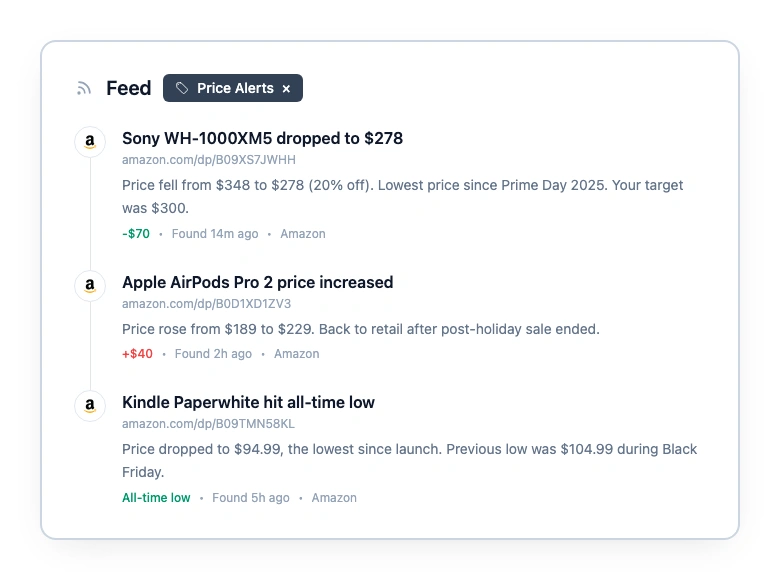
Here's the thing. CamelCamelCamel and Keepa are great for Amazon. But what about the products Amazon doesn't sell? B2B software pricing pages. Competitor websites. Niche retailers without APIs.
Changeflow monitors any webpage for changes. Add a pricing page URL, tell the AI what you care about, and get alerts with plain-English summaries when something changes. It's not an Amazon-specific tool. It's for tracking price changes everywhere else.
If you already use CamelCamelCamel for Amazon deals, Changeflow fills the gap for everything outside Amazon. Competitor pricing pages, SaaS plan changes, MAP compliance monitoring.
Strengths: Works on any website, AI summarizes what changed, tracks more than just price (features, terms, positioning), visual diff shows exactly what changed.
Limitations: Not Amazon-specific (no product matching or price charts), starts at $99/mo for more than 3 sources, better for B2B than consumer deal-hunting.
Bottom line: Not a replacement for CamelCamelCamel. A companion for the websites CamelCamelCamel can't touch.
10. Visualping
Best for: Screenshot-based visual monitoring
Price: Free (150 checks/mo, 5 pages) | Paid from $10/mo
Visualping takes screenshots of web pages and alerts you when something changes visually. You can use it for Amazon pages, but it's a general website monitor, not a dedicated price tracker.
The free plan gives you 150 checks per month on up to 5 pages. Paid plans start at $10/mo for higher frequency and more pages. It works on any website, not just Amazon.
Strengths: Visual comparison (see exactly what changed), works on any website, free plan for basic use, team collaboration on paid plans.
Limitations: Screenshot-based (doesn't extract specific price data), limited free tier, can't set target price alerts, noisy if pages change frequently for non-price reasons.
Bottom line: Better for general website monitoring than dedicated price tracking. Consider a Visualping alternative if you need more targeted alerts.
How Amazon Pricing Works (And Why You Need a Tracker)
Amazon uses dynamic pricing algorithms that evaluate competitor prices, demand, inventory levels, time of day, and even your browsing history. The system updates roughly every 10 minutes on competitive products. By comparison, Best Buy and Walmart change prices about 50,000 times per month. Amazon does that in half an hour.
Research from Northeastern University found over 500 third-party sellers using algorithmic pricing strategies on Amazon Marketplace alone. These sellers win the Buy Box more often and stay active longer than sellers pricing manually.
The "Was" prices are the real problem. Consumer Watchdog found 61% of Amazon products use inflated reference prices. A study of vacuum cleaners showed 26% of listings pretended to offer discounts while actually raising prices by an average of 23%. During Prime Day 2025, 54.9% of products showed no real price drop in the weeks before the event.
Price trackers cut through this by showing actual historical data. Was this TV really $799 last month? Or has it been $499 for six months? A price history chart answers that in seconds.
The biggest savings come during sales events. Prime Day (July), Prime Big Deal Days (October), and Black Friday (November) typically see genuine discounts of 15-25% on popular items. A tracker tells you whether the "deal" is real or just the price from two weeks ago.
How to Choose the Right Tracker
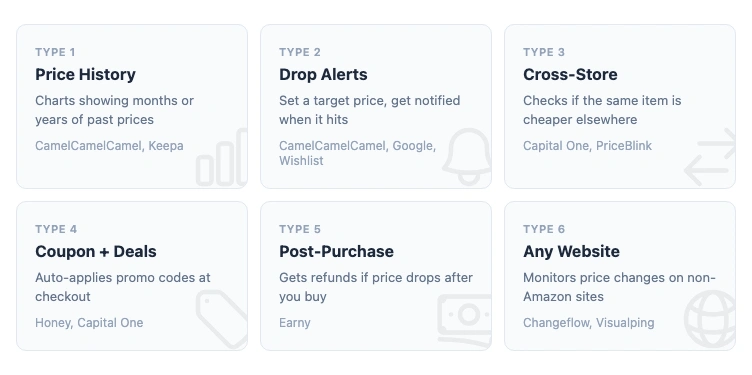
If you want the simplest option: Google Shopping's built-in price tracking or Amazon Wishlist. Zero install, zero configuration.
If you want the best free price tracker: CamelCamelCamel. Years of price history, reliable alerts, covers nine Amazon marketplaces.
If you want maximum data: Keepa. Especially valuable if you're an Amazon seller doing product research.
If you want more than just price tracking: Honey or Capital One Shopping. Both compare prices across retailers and apply coupons automatically.
If you want post-purchase protection: Earny. It monitors purchases you've already made and gets refunds when prices drop.
If you need to track prices outside Amazon: Changeflow for any website, or Visualping for visual monitoring.
A Note on Privacy
Browser extensions have access to everything you see online. Research from Georgia Tech found over 3,800 Chrome extensions collecting and leaking sensitive user data, affecting 60 million users.
Price tracking extensions are no exception. Many generate revenue by collecting and selling browsing data. Before installing any extension:
- Read the privacy policy (seriously)
- Check what permissions it requests
- Stick with well-known, well-reviewed extensions
- Consider web-based alternatives (CamelCamelCamel's website, Google Shopping) if privacy matters more than convenience
The safest options on this list are CamelCamelCamel (transparent about data practices), Google Shopping (no extension needed), and Amazon Wishlist (built-in).
Frequently Asked Questions
What is the best free Amazon price tracker?
CamelCamelCamel is the best free Amazon price tracker for most people. It offers unlimited price history, email alerts, and a browser extension called The Camelizer. Keepa is a close second if you want price charts embedded directly on Amazon product pages.
How often do Amazon prices change?
Amazon changes prices on popular products multiple times per day. Some estimates put it at 2.5 million price changes daily across the platform. Factors include competitor pricing, demand, inventory levels, time of day, and whether a sales event is running.
Can you track Amazon price history?
Yes. CamelCamelCamel and Keepa both store years of Amazon price history for most products. You can see historical highs, lows, and averages to decide if the current price is a good deal or if you should wait for a drop.
Do Amazon price trackers sell your data?
Some browser extensions collect and sell browsing data. Research from Georgia Tech found over 3,800 Chrome extensions leak user data. Stick with well-known trackers like CamelCamelCamel, Keepa, and Google Shopping. Always check the privacy policy before installing any extension.
Does Amazon have a built-in price tracker?
Amazon does not have a dedicated price tracker, but you can add items to your Wishlist and Amazon will email you when prices drop. Google Chrome also has a built-in Track Price button on shopping pages that sends notifications when prices fall.
Track prices on any website
Changeflow monitors any page for changes. Set it up in 30 seconds, get alerts when something changes.
Try Changeflow FreeNo credit card required
More from Learn

Wayback Machine for Legal Research: A Law Librarian's Guide
Half the URLs in old briefs are dead. Here is how law librarians use the Wayback Machine and stronger archives to verify citations, build timelines, and support litigation.

Law Librarian Current Awareness Audit Checklist (2026)
A 27-question audit covering coverage, cadence, relevance, distribution, resilience, and value. Built for law librarians and knowledge lawyers running current awareness at Am Law 200 firms.

Audit-Ready Web Archives: SEC 17a-4, FDA, and HIPAA Rules
Free archive tools fail under regulatory audit. Here is what SEC 17a-4, FDA 21 CFR Part 11, and HIPAA require from a web archive that holds up under examination.