
Learn how to monitor competitor websites for pricing, product, and content changes. Tools, strategies, and what to track.

Your competitor raised their prices last month. They launched a new feature two weeks ago. They hired six engineers in Q4.
You found out about none of it.
That is the cost of not monitoring competitor websites. And it's not just about missing a price change. It's about making decisions with incomplete information. Every day.
The fix is simple: set up automated monitoring so you know when competitors change their pricing pages, product pages, job postings, or any other public webpage. Changeflow makes this easy. Add a URL, tell the AI what matters, and get alerts when something changes. The same principles apply whether you are watching competitors or regulators, so if you want the general playbook first, our guide on how to monitor website changes ranks the five common methods by effort and cost.
Here's how to build a competitor monitoring program that actually works.
Why You Need to Monitor Competitor Websites
Most companies check competitor websites manually. Someone on the team visits a few URLs, scrolls around, maybe takes a screenshot. Maybe once a month. Maybe when they remember.
That's not monitoring. That's hoping you'll notice something important.
According to Crayon's State of Competitive Intelligence report, 90% of businesses say their industry has gotten more competitive in the last three years. But fewer than half have a systematic way to track what competitors are doing.
The gap between those two numbers is where you lose deals.
Automated competitor website monitoring solves this by:
- Catching changes in real time, not weeks later
- Covering more ground than any human could manually
- Creating a record of what changed and when
- Freeing up your team to analyze and act, instead of check and compare
Monitor any competitor website
Changeflow watches competitor pages and sends you AI summaries of what changed.
Free plan available. No credit card required.
What to Monitor on Competitor Websites
Not everything on a competitors website matters. Focus on the pages that signal real business decisions.
Pricing Pages
The most valuable thing you can track. When a competitor raises prices, drops a tier, or adds usage limits, you need to know immediately. Not from a customer asking why you're more expensive.
Track the pricing page itself plus any supporting pages like plan comparison tables and FAQ sections. Tools built for competitor price tracking and price intelligence make this simple.
Product and Feature Pages
New features tell you where competitors are investing. Removed features tell you what didn't work. Messaging changes on product pages reveal shifts in positioning.
Watch for:
- New product announcements
- Feature additions or removals
- Changes to feature descriptions or positioning
- New integrations or partnerships
- Updates to technical documentation
Job Postings
Hiring is a leading indicator. A competitor posting for five machine learning engineers probably plans to ship AI features. Ten new sales reps in the Southeast means they're expanding there.
Job boards change frequently, so set these to check daily.
Press Releases and Newsrooms
Funding announcements, leadership changes, product launches, partnerships. Companies put their biggest moves here first.
Blog Content and Resources
New blog posts reveal content strategy. New case studies show which industries they're targeting. Updated comparison pages mean they're going after specific competitors (maybe you).
Terms of Service and Legal Pages
Changes to terms of service often signal policy shifts that affect customers. Price changes, data handling updates, and service level modifications frequently appear in legal pages before they're announced publicly. Compliance teams especially need to track these changes closely, and compliance monitoring software can automate this across dozens of vendors.
Landing Pages and Ad Copy
If you track competitor landing pages, you can see their messaging evolve in real time. New headlines, new value propositions, new social proof. It's a window into their marketing strategy.
How to Set Up Competitor Website Monitoring
Step 1: Pick Your Competitors
Start with 3 to 5 direct competitors. These are companies your prospects mention in sales calls or that show up in the same search results.
Don't monitor everyone. Monitor the ones that actually take deals from you.
Step 2: Choose Your Pages
For each competitor, identify 5 to 10 high-value pages:
| Page Type | Why It Matters | Check Frequency |
|---|---|---|
| Pricing page | Direct impact on your win rate | Daily or hourly |
| Product/features | Shows roadmap direction | Daily |
| Job postings | Hiring signals strategy | Daily |
| Press releases | Major announcements | Daily |
| Blog/resources | Content strategy shifts | Weekly |
| Terms of service | Policy and legal changes | Weekly |
| Landing pages | Messaging and positioning | Weekly |
Step 3: Set Up Automated Monitoring
This is where a tool like Changeflow saves you hours. For each page:
- Paste the URL
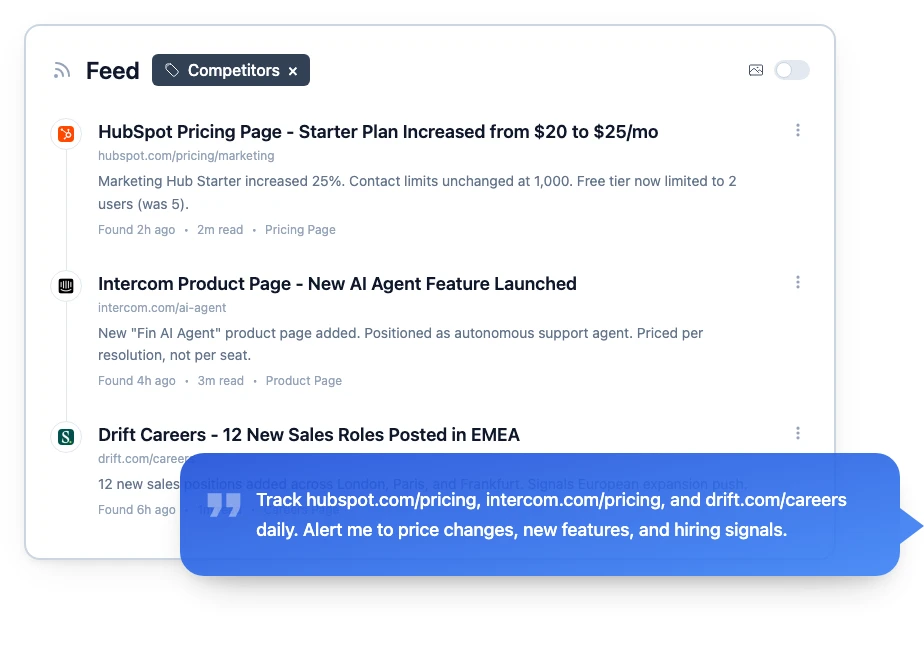
- Tell the AI what you care about ("alert me when pricing changes" or "notify me about new features")
- Set your check frequency
- Choose where to receive alerts (email, Slack, webhook)
Changeflow's AI reads the page and sends you a plain-English summary of what changed. No wading through highlighted diffs.
For comparison pages and visual changes, you might also look at Wayback Machine alternatives to see historical snapshots.
Step 4: Organize Your Monitoring Program
Structure matters. Without organization, alerts become noise.
By competitor: Group all tracked pages for each competitor into a folder or workspace. When you need a full picture of what Competitor X is doing, it's all in one place.
By type: Alternatively, group by page type. All pricing pages together. All job postings together. This works better when you have different people responsible for different intelligence categories.
Tag and filter: Use tags so you can pull up "all pricing changes this quarter" or "everything Competitor X did last month."
Best Competitor Monitoring Tools
You have options. The right tool depends on what you're tracking and how technical your team is.
Changeflow: Monitors any webpage for changes. AI summarizes what changed. Best for B2B teams tracking competitor pricing, products, and content across multiple sites. From $99/mo. See pricing.
Visualping: Screenshot-based monitoring. Good for simple visual comparisons but noisy on dynamic pages and no AI summaries.
Google Alerts: Free but limited. Tracks mentions of keywords in news and web search results, not actual page changes.
Crayon: Enterprise competitive intelligence platform. Tracks competitor websites, social media, reviews and more. Priced for larger teams.
Klue: Competitive enablement for sales teams. Collects intel and turns it into battle cards. Enterprise pricing.
For a full breakdown of every category, see our competitive intelligence tools guide. For price-specific tracking, our competitor price tracking tools comparison covers 10 options in detail.
What to Do With Competitor Intelligence
Collecting intelligence is pointless if nobody acts on it. Here's how to turn monitoring into action.
Share With Your Team
Route alerts to the people who can act. Pricing changes go to sales and product. Feature launches go to product and marketing. Job postings go to leadership.
The SCIP (Strategic & Competitive Intelligence Professionals) framework calls this the "intelligence cycle." Collection is only step two. Analysis and dissemination are where the value lives.
Build a Competitive Brief
Once a month, review all the changes you've captured. Write a one-page summary:
- What did each competitor change?
- What does it signal about their strategy?
- How should we respond (if at all)?
Keep it short. Keep it actionable. If your brief is longer than one page, you're overthinking it.
Update Sales Battle Cards
When a competitor changes pricing or features, update your sales team's battle cards the same day. Stale battle cards lose deals.
Know When NOT to React
Not every competitor move deserves a response. Harvard Business Review notes that the best competitive intelligence programs focus on pattern recognition over time, not knee-jerk reactions to individual changes.
A competitor launching one blog post is noise. A competitor publishing 20 articles about your target industry in two months is a signal. The same pattern recognition applies to regulatory change management, where one guidance update is routine but a cluster signals enforcement is coming.
Recommended Monitoring Schedule
Here's a practical schedule that works for most B2B teams:
Daily (automated):
- Pricing pages for top 3 competitors
- Product/feature pages
- Job postings
Weekly (automated + review):
- Blog content and resources
- Landing pages and ad copy
- Terms of service and legal pages
- Review the week's alerts and flag anything important
Monthly (analysis):
- Compile competitor intelligence brief
- Update battle cards
- Discuss patterns in team meeting
- Adjust monitoring based on what you've learned
Common Mistakes to Avoid
Tracking too many competitors. Five is plenty to start. You can always add more.
Monitoring everything on every site. Pick the pages that actually matter. Tracking a competitor's 404 page is a waste of alerts.
Collecting without acting. If nobody reads the alerts, you don't have a competition tracking program. You have a notification graveyard.
Overreacting to every change. A competitor rewording their homepage headline is not a five-alarm fire. Save your energy for meaningful shifts.
Start Monitoring Competitor Websites Today
You are already behind on what your competitors did this week. The longer you wait, the wider that gap gets.
Pick your top 3 competitors. Pick 5 pages each. Set up monitoring. It takes less than 10 minutes.
Changeflow watches competitor websites for you and sends AI summaries of what changed. Used by competitive intelligence and product marketing teams across SaaS, consulting, and regulated industries.
Monitor competitor websites automatically
Get AI-powered alerts when competitors change their pricing, products, or content. Set up in 60 seconds.
Try Changeflow FreeNo credit card required
More from Learn

Wayback Machine for Legal Research: A Law Librarian's Guide
Half the URLs in old briefs are dead. Here is how law librarians use the Wayback Machine and stronger archives to verify citations, build timelines, and support litigation.

Law Librarian Current Awareness Audit Checklist (2026)
A 27-question audit covering coverage, cadence, relevance, distribution, resilience, and value. Built for law librarians and knowledge lawyers running current awareness at Am Law 200 firms.

Audit-Ready Web Archives: SEC 17a-4, FDA, and HIPAA Rules
Free archive tools fail under regulatory audit. Here is what SEC 17a-4, FDA 21 CFR Part 11, and HIPAA require from a web archive that holds up under examination.