Federal grant deadlines shift without warning. Here's how to monitor Grants.gov, NSF, NIH, and agency pages so you never miss a funding window.

How to Track Federal Grant Deadlines
A university research office submitted an NSF proposal two days before the deadline. Or so they thought. NSF had extended the deadline by three weeks, buried in an amendment to the NOFO page. The team could have spent those extra weeks strengthening the proposal. Instead, they rushed a weaker application because nobody caught the change.
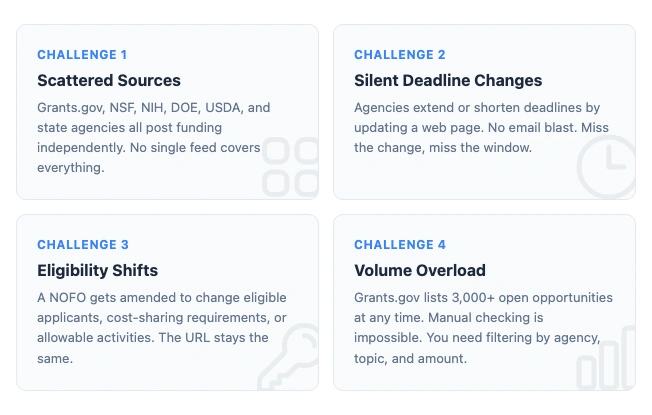
This happens in reverse too. Agencies shorten deadlines. Amend eligibility criteria. Withdraw funding entirely. The page URL stays the same. The changes don't always trigger an email.
If your grant strategy depends on checking Grants.gov manually or waiting for email blasts, you're working with incomplete information. This guide covers how to actually track website changes across federal funding sources, which agencies to watch, and how to build a monitoring system that catches deadline shifts before they cost you.
Why Federal Grant Deadlines Move
Federal agencies change grant deadlines more often than most applicants realize. The reasons vary, but the pattern is consistent: changes happen on web pages, not in press releases.
System outages are the most common trigger. When Grants.gov experiences technical issues during a submission window, agencies routinely extend deadlines. These extensions appear as amendments to the original NOFO, sometimes posted only on the agency's own site before Grants.gov catches up.
Budget uncertainty drives larger disruptions. During continuing resolutions or government shutdowns, agencies pause, amend, or withdraw funding opportunities. The 2025-2026 budget cycle saw dozens of NOFOs modified mid-stream. Teams that weren't monitoring the actual pages found out too late.
Low application volume occasionally prompts agencies to extend deadlines, especially for programs targeting underserved communities or new research areas. These quiet extensions are opportunities. If you catch one, you get extra time that competitors don't know about.
Policy changes can alter eligibility criteria, cost-sharing requirements, or allowable activities after the initial NOFO is published. The URL stays the same. The title stays the same. But the rules change.
Monitor regulatory pages automatically
Changeflow watches agency websites and tells you what changed and why it matters.
Free plan available. No credit card required.
Where Grant Changes Actually Appear
The biggest mistake in grant monitoring is treating Grants.gov as the single source of truth. It's the central repository, but it's not always first.
Grants.gov
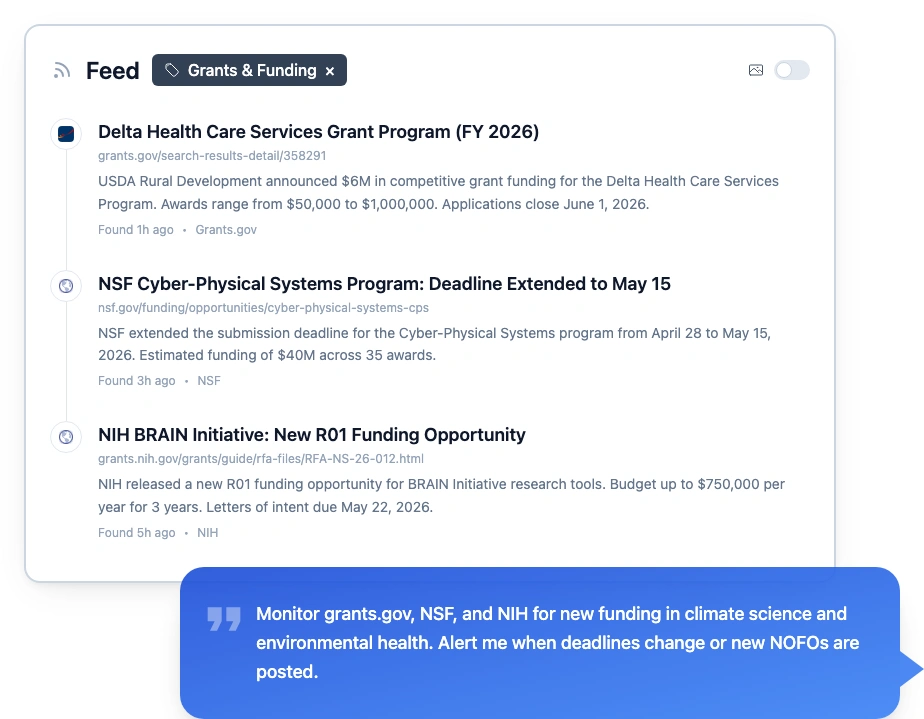
Grants.gov lists all discretionary federal funding opportunities, currently over 3,000 open at any time. It has built-in email subscriptions and an RSS feed. The problem is signal-to-noise. Subscribe to a broad category and you'll drown. Subscribe only to specific opportunities and you'll miss new ones.
The real gap is amendments. When an agency amends a NOFO, Grants.gov updates the listing page. If you subscribed to that opportunity, you might get an email. But the email doesn't always tell you what changed. You still need to compare the old version to the new one.
Agency Websites
Many agencies post funding opportunities on their own sites before they appear on Grants.gov. Sometimes days before.
- NSF uses research.gov for program solicitations. New Dear Colleague Letters (DCLs) often appear on nsf.gov first.
- NIH publishes funding opportunity announcements on grants.nih.gov through the NIH Guide. Parent announcements and reissues are posted there before anywhere else.
- DOE posts on energy.gov with program-specific pages that update independently.
- USDA distributes across NIFA, Rural Development, and other sub-agencies, each with their own timelines.
If you're only watching Grants.gov, you're seeing the aggregated feed with a delay. Monitoring agency pages directly gives you first-mover advantage.
The Federal Register
The Federal Register publishes formal Notices of Funding Opportunity. These are the legal announcements. But amendments, corrections, and deadline extensions don't always appear in the Federal Register. They often appear only on the agency's website or on Grants.gov. For the full picture of regulatory change management, you need to watch all three.
What Changes to Watch For
Not every page update matters. Here's what actually affects your grant strategy.
Deadline Extensions and Shortenings
The most time-sensitive change. An extended deadline means more prep time. A shortened one means you need to accelerate. Either way, you need to know immediately.
Eligibility Amendments
A NOFO gets amended to add or remove eligible applicant types, change matching requirements, or modify allowable costs. This can make a previously ineligible organization eligible, or vice versa. These changes hide in the amendment text without changing the opportunity title.
Funding Level Changes
Agencies increase or decrease total program funding, adjust per-award caps, or change the expected number of awards. A program that was offering $500K per award might quietly revise that to $250K.
New NOFOs in Your Area
New funding opportunities post constantly. The challenge is filtering them to your research areas, institution type, and funding range. Manual browsing doesn't scale when you're tracking multiple agencies and disciplines.
Withdrawals and Cancellations
Programs get cancelled. Sometimes mid-cycle. If you've been preparing an application for a program that gets withdrawn, you need to know before you invest more time. The cancellation often appears as a brief update to the existing NOFO page.
Free Tools for Grant Monitoring
Several free options exist. Each covers a different part of the problem.
Grants.gov Email Subscriptions
Create a Grants.gov account and subscribe to specific opportunities or saved searches. You'll get emails when matching opportunities are posted. The emails are basic, covering new postings and some modifications, but they don't always detail what changed in an amendment.
SAM.gov Assistance Listings
SAM.gov provides federal assistance listings that map to Grants.gov opportunities. It's useful for understanding the full scope of a program across fiscal years, but it's not designed for real-time change tracking.
NIH and NSF Email Lists
Both NIH and NSF offer their own notification systems. NIH's listserv covers Guide notices. NSF sends Dear Colleague Letters and program updates. These are worth subscribing to alongside broader monitoring, but they only cover their respective agencies.
Building a Grant Monitoring System
A manual check-once-a-week approach misses too much. Here's how to set up something reliable.
Step 1: Map Your Sources
List every agency and page that matters to your grant portfolio. Be specific. Don't just note "NIH." Note the exact program pages, the parent funding opportunity announcements, and the institute-specific pages you need. A typical research university might monitor 15-30 specific pages across 4-6 agencies.
Step 2: Set Up Automated Monitoring
Use a tool that can track government website changes across multiple sources. Point it at each page on your list. For Grants.gov listings, monitor the individual opportunity page, not just the search results.
Changeflow lets you describe what you care about in plain language. Tell it "alert me when deadlines change, new NOFOs are posted, or eligibility criteria are amended" and the AI filters out routine page updates that don't affect your work. This is the same approach teams use for compliance monitoring and FDA tracking.
Step 3: Create a Review Workflow
Alerts are only useful if someone acts on them. Designate a point person (or rotate responsibility) to review grant alerts daily. Flag deadline changes for immediate action. Route new opportunities to the relevant PI or department.
For larger offices, integrate alerts with your existing workflow. Changeflow sends to email, Slack, Microsoft Teams, or webhooks. The goal is making the alert land where decisions happen, not in a separate inbox nobody checks.
Step 4: Track Patterns Over Time
After a few months, you'll see patterns. Which agencies extend deadlines regularly. Which programs reissue annually. When new fiscal year funding typically drops. This intelligence helps you plan application timelines proactively instead of reactively.
Agency-Specific Tips
NSF
NSF posts Dear Colleague Letters (DCLs) that signal upcoming program changes before formal solicitations appear. Monitor the DCL page for your directorate. NSF also posts supplemental funding opportunities through existing awards, which don't always appear on Grants.gov.
NIH
The NIH Guide is the authoritative source for funding opportunity announcements. Pay attention to NOT-notices (Notices of Special Interest), which signal funding priorities under existing parent announcements. These are where NIH steers money without creating new programs.
DOE
DOE posts funding through ARPA-E, the Office of Science, and program-specific offices. Each has its own page and timeline. ARPA-E in particular posts on a different cadence than traditional DOE programs, with shorter windows.
USDA
USDA funding is distributed across NIFA (research), Rural Development (community), and other agencies. Each sub-agency posts independently. Regulatory compliance examples from agriculture often involve both funding and regulatory requirements.
Common Mistakes
Relying on a single source. Grants.gov is necessary but not sufficient. Agency websites, the Federal Register, and professional networks all carry information that Grants.gov doesn't have or has with a delay.
Checking manually on a schedule. Weekly manual checks miss mid-week changes. Deadline extensions posted on Monday are worthless if you don't see them until Friday.
Ignoring amendments. An amendment that changes cost-sharing from 25% to 50% fundamentally changes whether a program is worth pursuing. Read every amendment, not just the original NOFO.
Not monitoring after submission. Agencies sometimes post supplemental Q&A, webinar recordings, or clarifications after the application window opens. These can affect your submission strategy.
Treating all grants the same. A $50K planning grant and a $5M cooperative agreement require different monitoring intensity. Focus your most rigorous tracking on the opportunities that matter most.
What Good Grant Tracking Looks Like
A well-monitored grant portfolio means your team knows about new opportunities within hours, not weeks. Deadline changes reach the right people before they affect plans. Amendments are reviewed the day they're posted. And your submission timelines account for the actual funding landscape, not last month's snapshot.
The tools exist. Free email subscriptions cover the basics. Changeflow adds custom monitoring for the specific agency pages your team needs, with AI summaries of what changed and routing to the people who need to see it. The hard part isn't the technology. It's deciding to stop treating grant tracking as a manual, periodic task and start treating it as the real-time regulatory intelligence operation it needs to be.
Track grant deadlines automatically
Get alerts when agencies post new funding or change deadlines. AI reads the page and tells you what matters.
Try Changeflow FreeNo credit card required
More from Learn

Wayback Machine for Legal Research: A Law Librarian's Guide
Half the URLs in old briefs are dead. Here is how law librarians use the Wayback Machine and stronger archives to verify citations, build timelines, and support litigation.

Law Librarian Current Awareness Audit Checklist (2026)
A 27-question audit covering coverage, cadence, relevance, distribution, resilience, and value. Built for law librarians and knowledge lawyers running current awareness at Am Law 200 firms.

Audit-Ready Web Archives: SEC 17a-4, FDA, and HIPAA Rules
Free archive tools fail under regulatory audit. Here is what SEC 17a-4, FDA 21 CFR Part 11, and HIPAA require from a web archive that holds up under examination.